Want it harder? Hide the model answer and work each phase in a scratchpad against its time budget, then reveal and score yourself. Or simply read on: the checkpoints below work either way.
How Do Two Hundred People Edit One Design File at the Same Moment Without Anyone's Work Disappearing?
It is 4 pm on a Thursday and the checkout redesign is in review. Priya, the designer who owns the file, nudges the "Pay" button 8 pixels left. In another city Arjun is changing the same button's colour. Meera is dragging the whole frame onto a new page. A hundred and fifty more people are in the file, watching, their cursors drifting across the canvas.
Every one of those screens has to end up showing the same file. Priya must see her nudge the instant she makes it, not a round trip later. Arjun's colour and Priya's nudge must both survive. And if the server holding this file dies halfway through the review, no edit anyone saw applied may disappear.
- 13 million+ — monthly active users in the quarter to 31 March 2025, two-thirds of them not designers (S-1)
- ~690,000 — paid customers, March 2026, up from ~450,000 a year earlier (Figma's Q1 2026 results)
- 500 / 200 / 200 — per-file limits: people in the file, people editing, visible cursors (Figma's help centre)
- 2.2 billion+ — changes a day received by the multiplayer journal (Figma engineering, 2022)
- 95% within 600 ms — edits saved to the journal (same post)
- One process per document — how Figma's multiplayer servers run each file (Figma engineering, 2019)
For context:
Figma is a browser-based design tool; "multiplayer" is its word for editing one file together in real time
Its S-1 says each of its products is "built from the ground up with multiplayer in mind"
Everything not in the list above is an illustrative design target, not Figma's internal architecture
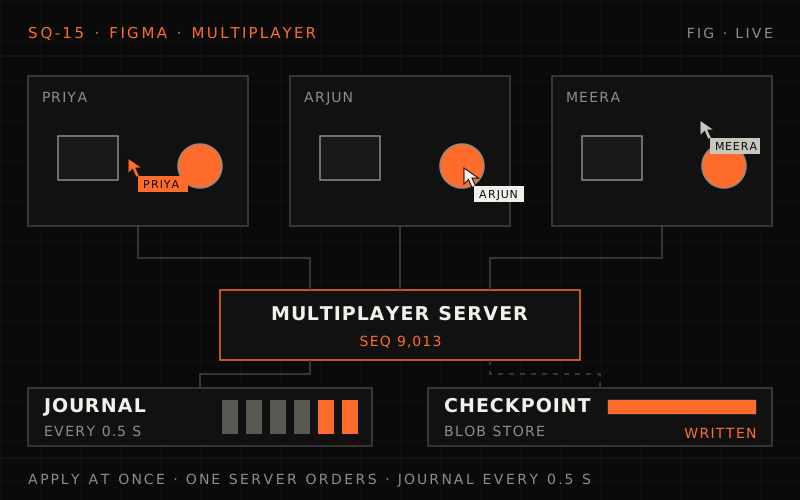
This is the system we'll design today.
Figma lets up to 500 people share one file, with 2.2 billion+ changes a day; cursors outnumber edits about 36 to 1, and open files fill ~12 TB of memory. Each edit applies locally at once, one multiplayer server per file sequences and echoes it, and a journal saves batches every half second behind checkpoints. The deep dives cover per-property last-writer-wins, the tree and cycles, the flicker rule, cursor fan-out and crash recovery with fencing, then offline merges, huge files and draining a 500-person review.
The Interview Begins#
You're interviewing at a company building a collaborative design tool. The engineering lead shares her screen: one file, forty cursors moving, a sidebar listing a hundred and ninety people.
"This is a design review. Forty people are editing, the rest are watching. Design the system that keeps all of them looking at the same file. Then tell me what happens when the machine holding this file has to go away."
People open a design file in a browser or desktop app and edit it together: moving, resizing, recolouring, grouping and reordering layers. Everyone sees everyone's changes and cursors live. The file is saved continuously, has a version history, and can be edited offline.
Requirements
- Show each person's edits to everyone else within a fraction of a second
- Never lose an edit its author saw applied, even through a server crash
- Show live cursors for everyone in the file
- Let people keep editing offline and merge their work back
- Open files with hundreds of thousands of layers quickly
"Leave out the rendering engine and the vector maths. I want the sync, the storage and the presence."
Phase 1: Requirements Clarification (5 minutes)#
"First I want to know what a document is, because that decides how conflicts work."
Your Questions#
"Is a file a sequence of characters, like a text document?"
"No. It's a tree of objects (pages, frames, shapes, text layers, components), each with properties: position, size, fill, text, its parent, its place among its siblings."
"If two people type into the same text layer at once, must their keystrokes merge?"
"No. Figma has written that simultaneous editing of the same text value doesn't work in Figma: one person's version wins. Assume that is acceptable."
"How many people in one file?"
"Usually one to three. Figma's help centre gives the ceiling: up to 500 people in a file, 200 of them editing, and 200 visible cursors. Past 500, newcomers get a static view."
"And overall?"
"Figma reported more than 13 million monthly active users in its 2025 S-1, and says people use it 'often for hours a day'. Design for that."
"Offline editing, version history, permissions?"
"Offline for as long as you like, then merge. Version history with autosaves and named versions; Figma's help centre says it 'records a new checkpoint every 30 minutes'. Permissions are per file: edit, view, and viewers can comment. Removing someone's access takes effect in an open session."
Functional Requirements#
- Editing: create, change, delete, reparent and reorder objects; every change visible to everyone in the file; undo and redo of your own changes
- Presence: live cursors, selections and avatars for everyone in the file
- Offline: keep editing without a connection; merge on reconnect
- History: continuous saving, autosaved versions, named versions, restore; branches that merge back
- Large files: open the page you need first, load the rest on demand
- Permissions: edit, view and comment per file, enforced on every change, revocable mid-session
Non-Functional Requirements#
Latency (design targets, same region)
- Your own edit on your screen: the next frame, never waiting for the network
- Edit to everyone else's screen: p95 < 150 ms, p99 < 300 ms
- Cursor movement to others: p95 < 150 ms, at least 10 updates a second per visible cursor
Durability
- An edit in the journal: 95% within 600 ms (what Figma reports), 99.9% within 2 s
- No loss of any journalled edit; edits not yet journalled stay on their author's device until they are
Scale
- 500 people in one file, 200 editing; files with hundreds of thousands of objects
- 13 million monthly users; a crashed or drained server costs a file a pause of seconds, not lost work
Phase 2: Back of the Envelope Estimation (5 minutes)#
"Three numbers matter: how many files are open at once, how much memory each needs, and how many messages one busy file fans out."
Before the numbers: how many files are open right now?
13 million monthly users. Suppose 40% use the product on a given day, for 3 hours each, and the busiest hour has twice the average concurrency. If an open file has 2.5 sessions on average, how many files are open at the peak?
One strong answer
- Daily users: 40% of 13 million = 5.2 million.
- Average concurrency: 5.2 million × 3 h ÷ 24 h = 650,000 sessions.
- Peak: twice that, 1.3 million; design for 1.5 million sessions (about 15% headroom).
- Open files: 1.5 million ÷ 2.5 = 600,000 files open at once.
Most of those files have one person in them. The hard cases are the few with hundreds.
Traffic Estimation#
| Value | |
|---|---|
| Daily users (40% of 13 M) | 5.2 million |
| Average concurrent sessions (× 3 h ÷ 24 h) | 650,000 |
| Peak sessions (2× = 1.3 M, plus headroom) | 1.5 million |
| Open files (÷ 2.5 sessions) | 600,000 |
- From Figma's journal: 2.2 billion changes a day ÷ 86,400 s ≈ 25,000 a second on average (2022)
- Peak at 3× average: ~76,000 a second. Cross-check: 10% of 1.5 M sessions actively editing × 0.5 change messages a second = 75,000 a second
- Design capacity:100,000 change messages a second; at ~150 bytes each, 15 MB/s inbound across the fleet
Conclusion: edits are a modest stream. The difficulty is ordering them, not carrying them.
Presence Estimation#
- Client sends a moving cursor at most 20 times a second (one per 50 ms); one cursor entry ≈ 16 bytes (session, x, y, page)
- Fleet: 40% of sessions share a file (600,000), 30% of those moving at any moment: 180,000 × 20 = 3.6 million cursor updates a second, 36 times the 100,000-a-second edit design peak
- A typical 3-person file: each person receives 2 cursors × 20 = 40 entries a second × 16 B = 640 bytes a second
- A 500-person review, worst case: 200 visible cursors all moving, sent to 499 others: 200 × 20 × 499 ≈ 2 million entries a second
- Per viewer: 200 × 20 × 16 B = 64 KB/s (512 kbit/s)
- For the file: 2 M × 16 B = 32 MB/s, 256 Mbps, from one server
Conclusion: cursors outnumber edits by more than thirty to one. They need their own cheap, lossy path.
Memory and Server Estimation#
- ~1 KB per object in memory (properties, vector paths, text): a typical 10,000-object file is 10 MB; a 500,000-object design system is 500 MB
- Mean over open files, skewed by big ones: 20 MB
- Total: 600,000 files × 20 MB = 12 TB of documents in memory
- Servers: 128 GB hosts with ~90 GB for documents: 12,000 GB ÷ 90 GB ≈ 134 servers; +30% headroom for drains, failures and big files ≈ 175
- Per server (of 175): ~3,400 documents, ~8,600 sessions, ~570 changes a second, ~21,000 cursor updates a second
- Edge: 1.5 M WebSockets ÷ 50,000 per gateway = 30, doubled across zones = 60 gateways
Conclusion: multiplayer servers run out of memory long before CPU or bandwidth. One huge file is the thing that hurts.
Storage Estimation#
- Journal: 25,000 changes a second × ~200 bytes stored = 5 MB/s ≈ 432 GB a day; kept 7 days ≈ 3 TB
- Checkpoints: compressed to ~10% of memory, so ~2 MB for a mean file; at peak ~100,000 files are edited each minute
- Every 60 s: 100,000 × 2 MB ÷ 60 s ≈ 3.3 GB/s (~27 Gbps) of uploads
- Every 10 minutes, with the journal carrying durability: 100,000 × 2 MB ÷ 600 s ≈ 333 MB/s (~2.7 Gbps), ten times less
- Recovery replay: at most 10 minutes × 2 journal batches a second = 1,200 batches after the last checkpoint
Key Metrics Summary#
| Metric | Value |
|---|---|
| Peak sessions / open files | 1.5 million / 600,000 |
| Change messages (average / design peak) | ~25,000/s / 100,000/s |
| Cursor updates at peak | ~3.6 million/s |
| One 500-person file, worst-case cursors | ~2 million entries/s, 256 Mbps |
| Documents in memory | ~12 TB on ~175 servers |
| Journal | ~432 GB a day |
Requirements and estimation
Q1/3 1.5 million sessions at peak, 2.5 sessions per open file on average. How many files are open?
Answer & explanation
Answer: B
1.5 million ÷ 2.5 = 600,000 open files, most with a single person in them.
Q2/3 Why are cursors estimated separately from edits?
Answer & explanation
Answer: C
3.6 million cursor updates a second against ~100,000 edits. A stale cursor is replaced by the next one, so it can go on a cheap path that never touches storage.
Q3/3 What runs out first on a multiplayer server?
Answer & explanation
Answer: A
12 TB of documents across ~175 servers. Per server the edit stream is only ~570 changes a second.
Phase 3: High-Level Design (10 minutes)#
Sketch it first: one nudge, everyone's screen
Trace Priya's 8-pixel nudge from her mouse to Arjun's screen and into storage. Who decides the order of edits? What does Priya wait for, and what can she ignore? Where do cursors go?
One strong answer
- Priya waits for nothing: her editor holds a copy of the file and applies the nudge at once.
- One authority per file: every editor of this file is connected to the same multiplayer server, which holds the file in memory, checks each change and gives it the next sequence number. That order is the truth.
- Echo and ack: the server sends the change to Arjun and everyone else, and acknowledges it to Priya.
- Save in the background: the server appends batches of changes to a journal about every half second, and writes a compressed checkpoint of the whole file now and then.
- Cursors go round the side: same connection, separate stream, kept only in memory, never saved.
"The file is shared, so somebody has to decide the order. I'll make that one server per file, holding it in memory, and keep everything slow off its path."
System Architecture#
%% title: Multiplayer design tool architecture
flowchart TD
  subgraph L1["Layer 1 · Clients"]
    direction LR
    ED["Browser and desktop editors<br/>a local copy of the file"]:::client
    MOB["Mobile apps<br/>prototypes, comments"]:::client
  end
  subgraph L2["Layer 2 · Edge"]
    direction LR
    GW["WebSocket gateways<br/>TLS, session, route by file"]:::edge
    API["HTTP API + CDN<br/>file list, images, fonts"]:::edge
  end
  subgraph L3["Layer 3 · Control"]
    direction LR
    AUTH["Permissions<br/>role per file, revocations"]:::service
    RT[("Router + lock table<br/>file to owner, lock UUID")]:::store
  end
  subgraph L4["Layer 4 · Multiplayer (one authority per file)"]
    direction LR
    MP["Multiplayer server<br/>whole file in memory, sequences changes"]:::hot
    PR["Presence<br/>cursors and selections, memory only"]:::cache
  end
  subgraph L5["Layer 5 · Durability"]
    direction LR
    JR[("Journal<br/>changes in ~0.5 s batches")]:::store
    CK[("Checkpoints<br/>compressed file in blob storage")]:::store
    AS[("Asset store<br/>images by content hash")]:::store
  end
  subgraph L6["Layer 6 · Around the file"]
    direction LR
    VH["Version history<br/>autosaves, named versions"]:::service
    META[("Metadata database<br/>files, teams, comments")]:::store
  end
  L1 ==>|"changes, cursors"| L2
  L2 ==> L4
  L2 -.->|"on join: may this user edit?"| L3
  L4 ==>|"journal, checkpoints"| L5
  L5 -.-> L6
KEY INSIGHTS:
- One authority per file: the server that owns a file is the only place its order is decided; no consensus protocol runs per edit
- The file lives in memory there: checks and sequencing are memory operations, and storage is written behind them
- Cursors never touch storage: they share the connection but not the journal
Data Flow: One Nudge#
%% title: One nudge, from Priya to Arjun and into the journal
sequenceDiagram
  autonumber
  participant P as Priya's editor
  participant S as Multiplayer server
  participant J as Journal
  participant A as Arjun's editor
  Note over P: drags the Pay button 8 px left
  P->>P: Apply at once, x = 112, mark unacknowledged
  P->>S: change c41 · button.x = 112
  S->>S: May edit? Object exists? Sequence 9,012
  S-->>P: ack c41 = seq 9,012
  S-)A: seq 9,012 · button.x = 112
  A->>A: Apply, redraw on the next frame
  Note over S,J: every ~0.5 s
  S->>J: batch 9,001 to 9,040, only if the lock matches
  J-->>S: written
  S-)P: saved up to 9,040
  P->>P: Drop c41 from the outbox
MEANWHILE, IN PARALLEL:
- Priya's and Arjun's cursors stream both ways 20 times a second on the presence path, never written anywhere
- The 150 viewers receive seq 9,012 too; they can't send changes, so the server never has to check theirs
High-level design
Q1/3 Who decides the order of two concurrent edits to the same file?
Answer & explanation
Answer: B
One server per file sequences every change. Clocks never decide, so clock skew can't reorder edits.
Q2/3 Priya's nudge appears on her own screen when?
Answer & explanation
Answer: A
Edits apply optimistically. The ack and the save happen in the background.
Q3/3 Why do cursors use a separate stream on the same connection?
Answer & explanation
Answer: D
A lost cursor update is replaced by the next one. Keeping them out of the journal keeps the durable path small.
Phase 4: Deep Dives (20 minutes)#
Deep Dive 1: The Data Model and Conflict Rules (Week 5 Concepts: Conflict Resolution)#
"A design file needs very little of the hard conflict machinery, because of what its edits look like."
This builds on Week 5, Day 4 · Conflict Resolution: LWW registers, LWW-Maps, CRDT merge rules and the OT example.
Three edits to one button
At the same moment Priya sets the button's x to 112, Arjun sets its fill to coral, and Meera sets its x to 140. What should the button look like afterwards, on every screen? What has to be true of the system for every screen to agree?
One strong answer
- Different properties don't conflict: the fill and the position are separate values, so the button ends up coral with one of the two
xvalues. - The same property: last writer wins. Whichever of Priya's and Meera's changes reaches the server second is the final
x. Nobody's number is averaged or merged; the result is always a value someone actually chose. - "Last" means last to arrive at the server, not the latest timestamp. Week 5 Day 4's first LWW problem, clock skew, disappears because the server's sequence number is the only clock.
- Every screen agrees because every screen applies the server's order; the loser's screen briefly showed its own number.
What Figma has written: a document is "a two-level map: Map<ObjectID, Map<Property, Value>>"; its servers "keep track of the latest value that any client has sent for a given property on a given object", so "changes are atomic at the property value boundary". Figma "isn't using true CRDTs": with the server as central authority it can simplify, "inspired by multiple separate CRDTs". In Week 5's terms the document is an LWW-Map of LWW-Maps whose "timestamp" is the server's sequence number.
Operational transformation
- Built for character offsets in text: each edit is transformed against concurrent ones
- Correctness proofs are notoriously hard; Figma called OT "unnecessarily complex for our problem space"
- Design edits are mostly "set this property", which needs no transformation
A full peer-to-peer CRDT
- Merges without any server, offline for ever
- Every replica carries the metadata to merge anything, such as per-element IDs and tombstones
- Rules like "no cycles in the tree" need clever algorithms when nobody is in charge
Server-ordered, per-property LWW
- Each property is a register; the server's order picks the winner
- The server can simply refuse a bad change (a cycle, a deleted object)
- Needs a connection to the owner to commit; offline edits are replayed on reconnect
The tree: parent pointers and fractional indexing#
%% title: A file as a tree of objects
flowchart TD
  DOC["0:0 · Document"]:::core
  PG["1:2 · Page 'Checkout'<br/>parent 0:0 · pos 0.5"]:::service
  FR["17:9 · Frame 'Pay screen'<br/>parent 1:2 · pos 0.5"]:::service
  BT["17:204 · Button<br/>parent 17:9 · pos 0.25<br/>x 112 · fill coral"]:::hot
  TX["17:205 · Text 'Pay now'<br/>parent 17:9 · pos 0.5"]:::service
  IM["22:31 · Image<br/>parent 17:9 · pos 0.75<br/>asset by content hash"]:::service
  DOC --> PG --> FR
  FR -->|"children sorted by pos"| BT
  FR --> TX
  FR --> IM
- Object IDs carry the client: Figma assigns "every client a unique client ID" and includes it in new object IDs, so two clients can create objects offline without colliding (
17:204is client 17's 204th object). - The parent is a property of the child. Moving a layer into another frame is one property write, with last-writer-wins like any other.
- Order among siblings is a fraction between 0 and 1; inserting between two siblings takes their average, so nothing else is renumbered. Figma stores arbitrary-precision fractions as base-95 strings, so precision never runs out.
- Same spot, same moment: if two inserts pick the same position, "the server can avoid ever having two objects with an identical position by just generating and assigning a unique position to the second insert operation". The two may interleave, which Figma notes is "usually fine" in a design.
Reparenting and cycles#
Meera drags frame A into frame B while Arjun drags frame B into frame A. Each move alone is fine; both together make A the parent of B and B the parent of A, a loop cut off from the document.
- The server refuses: Figma's servers "reject parent property updates that would cause a cycle". Whichever move arrives second is rejected, and its author's editor puts the layer back.
- Until the rejection arrives, a client may briefly hold a cycle (its own move plus the one it just received); Figma's client temporarily removes such objects from the tree until the server answers.
- Without a central server you would need a replicated-tree move algorithm, such as Kleppmann and colleagues' CRDT for moves in replicated trees. One authority makes it a single check.
# multiplayer/document.py

"""
One file's authority (illustrative). The whole file is in memory as
{object_id: {property: value}}. Changes are applied in arrival order and
each accepted one gets the next sequence number. Last writer wins per
property, where "last" means last to reach this server, never a clock.
"""

from dataclasses import dataclass, field
from fractions import Fraction
from typing import Any, Dict, Optional

ROOT = "0:0"


@dataclass
class Change:
    client_id: int
    change_id: int               # increasing per client: makes resends harmless
    obj: str                     # "client:counter", e.g. "17:204"
    props: Dict[str, Any]        # {"x": 112} or {"parent": "17:9", "pos": Fraction(1, 4)}
    create: bool = False


@dataclass
class Result:
    ok: bool
    seq: int = 0
    reason: str = ""
    server_values: Dict[str, Any] = field(default_factory=dict)   # for the client's rollback


class Document:
    def __init__(self, objects: Dict[str, Dict[str, Any]], seq: int):
        self.objects, self.seq = objects, seq
        self.applied: Dict[int, int] = {}            # client_id -> highest change_id applied

    def apply(self, ch: Change, can_edit: bool) -> Result:
        if not can_edit:
            return Result(False, reason="VIEW_ONLY")
        if ch.change_id <= self.applied.get(ch.client_id, 0):
            return Result(True, seq=self.seq, reason="DUPLICATE")   # resent after a reconnect
        obj = self.objects.get(ch.obj)
        if obj is None and not ch.create:
            return Result(False, reason="DELETED")                   # someone removed it first
        old = obj or {}
        parent = ch.props.get("parent", old.get("parent"))
        if obj is not None and "parent" in ch.props and self._inside(parent, ch.obj):
            return Result(False, reason="CYCLE", server_values={"parent": old.get("parent")})
        props = dict(ch.props)
        if "pos" in props:
            props["pos"] = self._free_pos(parent, ch.obj, props["pos"])
        self.objects.setdefault(ch.obj, {}).update(props)            # last writer wins, per property
        self.seq += 1
        self.applied[ch.client_id] = ch.change_id
        return Result(True, seq=self.seq, server_values=props)       # pos may have been moved

    def _inside(self, node: Optional[str], target: str) -> bool:
        """True if `node` is `target` or one of its descendants."""
        while node is not None and node != ROOT:
            if node == target:
                return True
            node = self.objects.get(node, {}).get("parent")
        return False

    def _free_pos(self, parent: str, me: str, pos: Fraction) -> Fraction:
        """A concurrent insert took this position: give this one the next free gap.
        (A real server keeps a sorted child list per parent instead of scanning.)"""
        taken = sorted(o["pos"] for k, o in self.objects.items()
                       if k != me and o.get("parent") == parent and "pos" in o)
        if pos in taken:
            later = [p for p in taken if p > pos]
            pos = between(pos, later[0] if later else Fraction(1))
        return pos


def between(a: Fraction, b: Fraction) -> Fraction:
    """Fractional indexing: a position strictly between two siblings."""
return (a + b) / 2Where the simple rule shows its edges:
- Text is one value. Figma's example: if one person changes a text layer "B" to "AB" and another to "BC", "the end result will be either AB or BC but never ABC". A product that needs merged typing would put a sequence CRDT (Week 5 Day 4's RGA) inside the text property only.
- Deletes need care. When an object is deleted, Figma keeps its properties in the undo buffer of the client that deleted it, not on the server. Undo re-creates it with the same ID; a later edit by someone else to a deleted ID is rejected.
Deep Dive 2: The Sync Protocol (Week 2 Concepts: Idempotency, Week 5: Consistency Models)#
"The protocol has one job: every client converges on the server's order, while the user never waits for the network and never sees their own edit flicker."
The flicker
Priya drags the button: her editor sends x = 100, 105, 112 over 150 ms. Meanwhile Meera's x = 140, which reached the server just before Priya's first one, is echoed to Priya. If Priya's editor simply applies whatever arrives, what does she see? What rule fixes it, and what if the server rejects her change?
One strong answer
- The bug: the button jumps to 140 under her cursor, then back to 112 when her own changes are echoed and acknowledged. That's flicker.
- The rule (Figma's): a client discards "incoming changes from the server that conflict with unacknowledged property changes". While Priya has an unacknowledged
x, incoming values for thatxare ignored. - Why it's safe: the server sends acks and echoes in sequence order on each connection. An echo that arrives before her ack was sequenced before her change, so her value would win anyway.
- Rejection: if the server refuses her change (the button was deleted, she lost edit access, a cycle), the reject carries the server's current value and her editor rolls the property back to it. That is the one time she sees the network override her.
The Solution:
%% title: The life of one local change
stateDiagram-v2
  [*] --> LOCAL: applied at once, sent
  LOCAL --> SEQUENCED: ack with seq
  LOCAL --> ROLLED_BACK: rejected, server value restored
  LOCAL --> LOCAL: reconnect, resent
  SEQUENCED --> SAVED: saved watermark passes seq
  SAVED --> [*]
  ROLLED_BACK --> [*]
  LOCAL: LOCAL · incoming values for its properties ignored
  SEQUENCED: SEQUENCED · ordered, kept and resent until saved
  SAVED: SAVED · in the journal, dropped from the outbox
  class LOCAL queue
  class SEQUENCED core
  class SAVED ok
  class ROLLED_BACK bad
- Two acknowledgements, not one (a design choice; Figma hasn't published its client protocol): "sequenced" ends the flicker rule for that property; "saved" (a watermark the server broadcasts after each journal write) lets the client forget the change.
- Idempotent resends: every change has a per-client
change_id; the server drops any it has already applied (Week 2's idempotency keys, applied to edits).
Priya sets a button's x to 112, Arjun its fill to coral and Meera its x to 140. Each edit shows locally at once; the file's server orders them by arrival, fill and x never conflict, and the last x to arrive (140) wins on every screen. While Priya drags (100, 105, 112), Meera's earlier 140 is echoed to her: applying it would flicker, so a property with an unacknowledged local change ignores incoming values, and 112 wins anyway.
# client/sync.py

"""
The client's half of the protocol (illustrative). Local edits apply at once.
A property with an unacknowledged local change ignores incoming values, so
the screen never flickers. Changes stay in the outbox until the server says
they are saved, so a server crash cannot lose them.
"""

from typing import Dict, Tuple

from protocol import Change      # the same dataclass the server uses


class Sync:
    def __init__(self, doc, ws, client_id: int):
        self.doc, self.ws, self.client_id = doc, ws, client_id
        self.next_id = 1
        self.unacked: Dict[Tuple[str, str], int] = {}   # (obj, prop) -> newest change_id
        self.outbox: Dict[int, Change] = {}             # change_id -> change, until saved
        self.seq_of: Dict[int, int] = {}                # change_id -> server seq, once acked
        self.last_seq = 0                               # newest server seq applied here
        self.epoch = ""                                 # owner's lock UUID that issued last_seq

    def edit(self, obj: str, props: dict) -> None:
        ch = Change(self.client_id, self.next_id, obj, props)
        self.next_id += 1
        self.doc.set(obj, props)                        # optimistic: on screen this frame
        for p in props:
            self.unacked[(obj, p)] = ch.change_id
        self.outbox[ch.change_id] = ch
        self.ws.send(ch)

    def on_remote(self, seq: int, obj: str, props: dict) -> None:
        self.last_seq = seq
        theirs = {p: v for p, v in props.items() if (obj, p) not in self.unacked}
        self.doc.set(obj, theirs)                       # our pending value will win anyway

    def on_ack(self, change_id: int, seq: int, server_values: dict) -> None:
        self.seq_of[change_id] = seq
        self.last_seq = max(self.last_seq, seq)
        self._settle(self.outbox[change_id], server_values)    # e.g. a pos the server moved

    def on_reject(self, change_id: int, reason: str, server_values: dict) -> None:
        ch = self.outbox.pop(change_id)
        if reason == "DELETED":
            self.doc.remove(ch.obj)
        self._settle(ch, server_values)                          # roll back to the truth

    def _settle(self, ch, server_values: dict) -> None:
        for p in ch.props:
            if self.unacked.get((ch.obj, p)) == ch.change_id:    # no newer local edit to it
                del self.unacked[(ch.obj, p)]
                if p in server_values:
                    self.doc.set(ch.obj, {p: server_values[p]})

    def on_saved(self, saved_seq: int) -> None:
        for cid in [c for c, s in self.seq_of.items() if s <= saved_seq]:
            self.outbox.pop(cid, None)
            del self.seq_of[cid]

    def on_reconnect(self, ws) -> None:
        self.ws = ws
        ws.send({"hello": True, "epoch": self.epoch, "last_seq": self.last_seq})   # catch me up
        for ch in sorted(self.outbox.values(), key=lambda c: c.change_id):
            for p in ch.props:
                self.unacked.setdefault((ch.obj, p), ch.change_id)
ws.send(ch) # duplicates are dropped by change_idReconnect and catch-up#
When a laptop wakes up or a train leaves a tunnel, the client reconnects with the last sequence number it applied:
- Recent gap: the server keeps the last few minutes of changes in memory and sends only those after
last_seq - Older gap: it reads the missed batches from the journal, which is ordered by sequence number
- Too old, or a different owner lost that history: the client downloads a fresh copy of the file and reapplies its outbox on top; Figma describes doing exactly this after offline editing
- Then the resends: the client's outbox goes out in order; changes the server already has are dropped as duplicates
Data model and sync
Q1/4 Priya and Meera set the same button's x at the same moment. What decides the final value?
Answer & explanation
Answer: C
Per-property last-writer-wins, where "last" is the server's order. No clocks, no merged numbers.
Q2/4 Meera moves frame A into B while Arjun moves B into A. What happens?
Answer & explanation
Answer: D
The server checks every parent change against the tree. The rejected client rolls the layer back.
Q3/4 Why does a client ignore incoming values for a property it has changed but not had acknowledged?
Answer & explanation
Answer: A
Acks and echoes come in sequence order, so an echo that arrives first was ordered first. If the change is rejected instead, the reject carries the server's value.
Q4/4 After a reconnect, why does resending the whole outbox not apply changes twice?
Answer & explanation
Answer: C
The server tracks the highest change_id applied per client and drops anything at or below it.
Deep Dive 3: Presence and Cursors at Fan-Out (Week 3 Concepts: Backpressure and Flow Control)#
"Cursors are the opposite of edits. Edits are rare and must never be lost; cursors are constant and only the newest one matters."
Two hundred cursors in one file
The review has 500 people and 200 visible cursors. If every cursor sends 20 updates a second and the server forwards each one to everyone, how many cursor entries leave the server each second? What would you change so that a phone in the review keeps up?
One strong answer
- Naive: 200 × 20 × 499 ≈ 2 million entries a second, 32 MB/s from one server for one file, and 64 KB/s into every phone.
- Coalesce: keep only the latest position per cursor and send each viewer one frame per tick with every cursor that moved. Same positions, 20 messages a second per viewer instead of 4,000.
- Send less: in a big room halve the rate to 10 a second; send only cursors inside the viewer's viewport; quantise coordinates to ~12 bytes per entry. Worst case: 200 × 10 × ¼ × 12 B ≈ 6 KB/s per viewer, ~24 Mbps for the file instead of 256.
- Smooth on the client: interpolate between positions, so 10 updates a second still looks fluid.
- Never save them: no journal, no checkpoint; a reconnecting client gets the current positions in its next frame.
The Challenge:
- Forwarding every cursor update to every person: work grows with the square of the room size
- Writing cursors into the change stream, so they get sequenced, journalled and replayed
- A slow phone whose unread cursor frames pile up in server memory
- Showing 500 cursors that cover the design under review
The Solution:
%% title: Cursors on their own path
flowchart TD
  IN(["Cursor moves<br/>client sends at most 20 a second"]):::client
  subgraph MP["Multiplayer server · presence, in memory only"]
    direction TB
    LAST[("Latest position per session<br/>overwritten, never appended")]:::cache
    TICK["Tick every 50 ms<br/>every 100 ms above 50 cursors"]:::core
    PICK{"Moved, among the 200 shown,<br/>inside this viewer's viewport?"}:::service
  end
  SEND(["One frame per viewer<br/>~12 bytes per cursor"]):::ok
  SKIP(["Socket backed up: skip<br/>the next frame is newer"]):::bad
  IN --> LAST --> TICK --> PICK
  PICK -->|"yes, socket keeping up"| SEND
PICK -->|"socket backed up"| SKIP- Keep only the newest: each session's latest position overwrites the last; a tick sends every viewer one frame with the shown cursors that moved inside its viewport.
- Never queue behind a slow reader: a socket with ~32 KB unsent skips the frame; once a second a keyframe carries every shown cursor, so a skipped frame can't leave one stuck.
- Figma's own limit caps visible cursors at 200; beyond that, extra cursors aren't shown to others, and editors' cursors take priority over viewers'.
- Selections, avatars and follow mode (watching a presenter's viewport) ride the same path: each is one more coalesced value.
Deep Dive 4: Persistence, Durability and One Owner per File (Week 5 Concepts: Leader Election and Fencing, Week 3: Audit Log)#
"The file lives in memory, so the questions are: how fast does an edit become durable, how does a new server rebuild the file, and how do we make sure only one server ever owns it?"
The server crashes mid-review
The server owning the review file dies. The last checkpoint is 8 minutes old. Edits up to sequence 9,412 are in the journal; Priya's last two changes, sequenced 9,413 and 9,414, were echoed to everyone but not yet saved. What does the new owner load, what happens to Priya's two changes, and how do you stop the old server, if it was only stalled, from writing again?
One strong answer
- Rebuild: the new owner loads the latest checkpoint, then replays every journal batch after the checkpoint's sequence number, up to 9,412. Eight minutes is at most ~960 batches at 2 a second: milliseconds of replay. For a huge file the slow part is decoding the checkpoint.
- Priya's changes survive: they were never saved, so they are still in her outbox. When her editor reconnects it resends them and the new owner sequences them again, as 9,413 and 9,414 or later if someone else's resend arrives first.
- Other people's screens: they saw 9,413 and 9,414 before the crash. Sequence numbers are tagged with the owner's lock UUID (an epoch), so a client reconnecting with "old epoch, seq 9,414" is past the 9,412 the new owner recovered from that epoch; it resyncs rather than trusting its own copy.
- Fencing: the new owner writes a fresh lock UUID for the file. Every journal write is conditional on the writer's UUID matching, so the old server's next write fails and it stops serving the file (Week 5 Day 5's fencing tokens).
- The real loss window: an unsaved change whose author's device also vanished. Figma set itself a target of "<1s of data loss".
What Figma has written: before 2022, multiplayer wrote each file to S3 "every 30 to 60 seconds" as a checkpoint, so a crash could lose "up to 60 seconds of work on the server-side". The journal records each change with a per-file sequence number, writes "every 0.5 seconds vs. every 60 seconds", and on recovery multiplayer loads the checkpoint and "queries for all entries that are newer". To avoid split brain, "multiplayer writes a (lock UUID, file key) entry to take ownership of that file", and journal writes are conditional on the lock UUID matching. The journal handles more than 2.2 billion changes a day, and 95% of edits are saved within 600 ms.
# multiplayer/durability.py

"""
Ownership and the journal for one file (illustrative). Every journal write
is conditional on this server still holding the file's lock, so a server
that lost ownership cannot write (fencing).
"""

import asyncio
import uuid

FLUSH_S = 0.5                    # journal batch interval


class LostOwnership(Exception):
    pass


class Owner:
    def __init__(self, file_key: str, kv, blobs):
        self.file_key, self.kv, self.blobs = file_key, kv, blobs
        self.lock = uuid.uuid4().hex
        self.buffer = []                          # accepted changes not yet journalled
        self.saved_seq = 0

    def open(self):
        self.kv.put("locks", self.file_key, {"lock": self.lock})        # the router chose us
        ck = self.kv.get("checkpoints", self.file_key)                  # {seq, blob_key}
        doc = Document.decode(self.blobs.get(ck["blob_key"]), seq=ck["seq"])   # slow for huge files
        for batch in self.kv.query("journal", self.file_key, after=ck["seq"]):
            doc.replay(batch)                                           # skips seq <= doc.seq; restores change_ids
        self.saved_seq = doc.seq
        return doc

    def _fenced(self):
        return ("locks", self.file_key, {"lock": self.lock})

    async def flush_loop(self, doc, broadcast_saved) -> None:
        while True:
            await asyncio.sleep(FLUSH_S)
            if self.buffer:
                batch, self.buffer = self.buffer, []
                ok = self.kv.put_if("journal", self.file_key,
                                    {"start": batch[0].seq, "end": batch[-1].seq, "changes": batch},
                                    condition=self._fenced())
                if not ok:
                    raise LostOwnership(self.file_key)    # stop serving; clients go to the new owner
                self.saved_seq = batch[-1].seq
                broadcast_saved(self.saved_seq)           # clients drop these from their outboxes
            # every 10 minutes or 5,000 changes: upload doc.encode() to blob storage and
# point the file's checkpoint at it with the same lock conditionA few details carry the correctness:
- The journal decides durability; checkpoints decide recovery time. So checkpoints can go from every minute to every ten (every 10 minutes or 5,000 changes here): uploads drop from ~27 Gbps to ~2.7 Gbps and nothing is less safe.
- A checkpoint may run a little ahead of the journal. That's safe: both come from the same owner's order, recovery replays only changes after the checkpoint's sequence number, and resent changes it already holds are dropped as duplicates. The blob can be uploaded anywhere; the pointer to it is fenced.
- Version history is a different "checkpoint". Figma's user-facing autosave (every 30 minutes) is an entry in the version history, kept for the plan's retention; the engineering checkpoint above is a recovery snapshot. Keep the words apart in the interview.
Routing every user of a file to its one owner#
- The router maps file → owner. On the first open it picks a server with spare memory; the server takes the lock and loads the file. Gateways ask the router once per session and cache the answer.
- Wrong server? If a gateway's cached route is stale, the server that doesn't hold the lock answers "moved", and the gateway asks again. A server never serves a file whose lock it doesn't hold.
- When the last person leaves, the server flushes, checkpoints and unloads the file after a few idle minutes, freeing memory for the next one.
Moving a hot or draining file#
Figma has written that on a multiplayer deploy, closing connections and waiting for unsaved changes to reach the journal takes under 1 second at the 99th percentile. Moving a big, busy file needs one more idea: warm the new owner before the old one lets go.
%% title: Moving one file off a draining host
sequenceDiagram
  autonumber
  participant C as Editors in the file
  participant O as Old owner
  participant R as Router and lock table
  participant N as New owner
  participant J as Journal
  R->>N: Prepare file F
  N->>J: Load checkpoint, follow the journal
  Note over N: decoding done before the cutover
  R->>O: Hand F to N
  O->>O: Stop sequencing, new changes stay in clients' outboxes
  O->>J: Flush the last batch, up to seq 9,412
  O-->>R: Flushed up to 9,412
  R->>R: Lock F with N's UUID, route F to N
  N->>J: Read the final batches up to 9,412
  O-)C: Moved: reconnect to N, jittered over 2 s
  C->>N: Hello, last seq 9,412, then the outbox
  N-->>C: Nothing missed, acks for the resent changes
  Note over O,J: any late write from O fails the lock check
Deep Dive 5: Offline Editing, Huge Files, Comments and Branches (Week 5 Concepts: Conflict Resolution, Week 4: Caching)#
"Offline is the sync protocol with a very long disconnect. Huge files are the memory problem moved onto the user's laptop."
Three hours on a plane
Arjun edits the checkout file for three hours on a flight: he recolours 40 buttons and moves a frame. Meanwhile, back on the ground, Priya recoloured 5 of the same buttons and deleted the frame Arjun moved. What happens when he lands and reconnects, and what would you show him?
One strong answer
- His edits were queued: each applied locally and went into an outbox on disk (IndexedDB in a browser), with its client and change IDs.
- On reconnect, replay: Figma's client "downloads a fresh copy of the document, reapplies any offline edits on top of this latest state", then keeps syncing. His outbox goes to the server like any other resend.
- Property rules decide: his 35 untouched buttons simply change. On the 5 both recoloured, his changes arrive last, so his colours win, overwriting Priya's newer work without asking. That is the cost of last-writer-wins after a long absence.
- Deleted under him: his move of the frame Priya deleted is rejected (the object no longer exists), and his editor drops it.
- What to show: a version from just before the merge (Figma's help centre says it adds autosave checkpoints when a connection is lost) and a summary: "5 of your changes replaced newer ones; 1 was to a deleted frame". A stricter product could hold long-offline conflicts for review instead.
Huge files: send the page, not the file#
Figma's 2024 post on dynamic page loading shows the shape of the answer: load "the first page and all of its read and write dependencies" and fetch other pages on demand. Read dependencies are things the page renders from elsewhere (components, styles, variables); write dependencies are objects an edit here would change automatically (auto layout, for example). The multiplayer server "holds both the full representation of the file and the QueryGraph of dependencies in-memory", and decides which edits each session needs.
- 33% — faster loads for the slowest files, while files grew 18% a year
- 70% — fewer objects loaded into the client's memory
- 33% — fewer users hitting out-of-memory errors
- 5 s+ — serial decoding time for the largest files on the server, cut by more than 40% with parallel decoding
- The client subscribes to pages, and the server filters the edit stream per session: a change on a page nobody in the session has loaded isn't sent to them.
- The server still holds everything, so permission checks, cycle checks and dependency updates always see the whole file. That's why our memory estimate counts full files.
- Images and fonts never sit in the document: objects hold a content hash; the bytes live in the asset store behind a CDN and are fetched as the page is drawn (Week 4's caching tiers).
Comments and branches#
- Comments aren't document objects. Figma's LiveGraph post lists comments among the features its real-time layer over Postgres serves. A comment stores the layer's ID, so deleting the layer orphans it rather than corrupting the file.
- A branch is a regular file, multiplayer included (Figma's branching post). On merge, Figma's help centre calls it a conflict when an element you changed "has been updated in the main file"; the user picks the main file's version or the branch's.
Presence, durability and offline
Q1/4 200 cursors at 20 updates a second, forwarded to 499 others. Roughly how many entries a second leave the server?
Answer & explanation
Answer: C
200 × 20 × 499 ≈ 2 million. Coalescing, a lower rate in big rooms and viewport filtering cut it by an order of magnitude.
Q2/4 After a crash, what does the new owner of a file load?
Answer & explanation
Answer: B
The checkpoint is the starting point and the journal fills in everything since; replaying a few minutes of batches is fast.
Q3/4 A stalled old owner wakes up and tries to write a journal batch. What stops it?
Answer & explanation
Answer: C
Fencing: the condition fails, the old server learns it lost ownership and stops serving the file.
Q4/4 Arjun's offline edits recolour five buttons Priya recoloured while he was away. With per-property last-writer-wins, what happens?
Answer & explanation
Answer: B
His replayed changes are sequenced after hers. A version saved before the merge and a summary of what was overwritten make that safe to live with.
Phase 5: Scaling and Edge Cases (5 minutes)#
"Walk me through a busy file's day, and then the cases that bite."
A File's Day#
- 9:00 AM · Opened
- No owner yet: the router picks a server with spare memory, which takes the lock, loads the checkpoint and replays the journal
- 10:00 AM-1:00 PM · Small-team editing
- Three people, a few changes a second; journal batches every 0.5 s, a recovery checkpoint every 10 minutes, an autosave version every 30 minutes
- 2:00 PM · Design review
- 300 people join; presence switches to 10 frames a second and viewport filtering; edits unchanged
- 3:30 PM · Host drained for a patch
- The file moves to a warmed-up owner; edits pause for about a second, nobody loses work
- 6:00 PM · Last person leaves
- Final flush and checkpoint; the file is unloaded after a few idle minutes
Edge Cases#
Edge case 1: Editing something just deleted
Problem: Arjun recolours a button that Meera deleted a moment earlier.
Solution: The server rejects the change (no such object) and Arjun's editor removes the button. If Meera undoes, her undo buffer re-creates it with the same ID and properties; Arjun can then recolour it again.
Edge case 2: Access removed mid-session
Problem: An admin removes Arjun's edit access while he is dragging layers.
Solution: The permission service pushes the change to the file's owner, which marks his session view-only. His next changes are rejected with the server's values, his editor rolls them back and reloads as a viewer.
Edge case 3: Undo after others have edited
Problem: Priya undoes her colour change after Arjun moved the same button.
Solution: Undo restores only Priya's own property (the colour), never Arjun's position. Figma's rule for undo: if you undo a lot, copy something and redo back to the present, "the document should not change".
Scaling and edge cases
Q1/3 A user's edit access is removed while they are editing. What happens to their next change?
Answer & explanation
Answer: C
Permissions are checked on every change at the owner; a reject carries the server's values for the rollback.
Q2/3 Why can a recovery checkpoint be written every 10 minutes instead of every minute?
Answer & explanation
Answer: A
Durability comes from the 0.5 s journal; a less frequent checkpoint just means more batches to replay after a crash.
Q3/3 A design review grows from 3 people to 300. What changes on the server?
Answer & explanation
Answer: D
The edit path barely notices 300 people; cursor fan-out is what grows with the square of the room.
Phase 6: Monitoring and Operations#
"For a multiplayer system the dashboard has to answer three questions: do edits reach people fast, are they safe, and is any one server or file in trouble?"
Monitoring Dashboard#
Sync
| Metric | Now |
|---|---|
| Edit to other screens, p50 / p95 / p99 | 48 / 121 / 262 ms |
| Change messages, fleet | 71,300/s |
| Rejected changes | 0.02% (deleted 310/min, cycle 41/min) |
| Reconnects, last minute | 3,100 |
Durability
- Saved within 600 ms: 96.4%; journal lag (oldest unsaved change) p99: 0.7 s
- Oldest recovery checkpoint: 9 min 40 s (alert at 20 min)
- Lock-check failures, last hour: 2 (both during a drain)
Servers
- Busiest server: 11,900 sessions, 84% of document memory; median 8,400 sessions
- Largest open file: 470 MB in memory, 300 people; cursor frames skipped for slow sockets 0.4%
Alerts (today)
- 13:52 (amber) — mp-117 at 84% document memory, two large files queued to move
- 13:58 (green) — file moved to mp-031 in 1.1 s, no lost changes
SLOs for the Platform#
SLO 1: No lost edits
- Target: 0 journalled edits lost; 95% of edits saved within 600 ms, 99.9% within 2 s
SLO 2: Edits reach everyone fast
- Target: edit to other screens p95 < 150 ms in every 5-minute window, per region
SLO 3: Smooth presence
- Target: visible cursors updated at least 10 times a second for 99% of viewer-seconds
SLO 4: Short pauses
- Target: a file moved by a drain or crash serves edits again within 5 s (p99)
Reading the dashboard
Q1/3 Edit latency is normal, but journal lag climbs to 8 seconds. What is at risk?
Answer & explanation
Answer: D
Others see edits through the in-memory path; the journal is what protects them. Lag widens the window a crash can take.
Q2/3 Why is "oldest recovery checkpoint" on the dashboard if the journal already makes edits durable?
Answer & explanation
Answer: B
Recovery time grows with the batches since the last checkpoint; a stuck checkpointer turns a fast failover into a slow one.
Q3/3 One server is at 84% of its document memory. What is the right first move?
Answer & explanation
Answer: B
Memory is the binding resource and big files are the lever; moving them costs each a pause of about a second.
Final Challenge: A 500-Person Review While Its Server Is Drained#
The interviewer drags a new window over the first. "One more."
"It's the company's quarterly design review. 500 people are in one file, the most it allows. Halfway through, the infrastructure team starts draining the host that owns it for an urgent kernel patch: everything must be off that host within 10 minutes. Keep every edit safe, keep the cursors smooth, and tell me what you'd degrade."
- 500 people in the file, 200 with edit access, 40 actively editing at ~2 change messages a second each
- 200 visible cursors, sent at 20 frames a second
- The file: 400,000 objects, ~400 MB in memory, a ~40 MB compressed checkpoint
- The host must be empty in 10 minutes; its uplink is 10 Gbps
- Blob storage reads at ~200 MB/s for one object (assumption)
What do you protect, and what do you degrade?
Work out the edit and cursor fan-out, compare a naive move (close everything, let 500 clients reopen the file) with a warmed handoff, and decide what people notice and what you shed.
One strong answer
- Edits are easy: 40 × 2 = 80 changes a second in; 80 × 499 ≈ 40,000 messages out, sent as one frame per viewer per 50 ms tick, 10,000 frames a second. At ~150 bytes a change, 12 KB/s per viewer, 6 MB/s (48 Mbps) for the file.
- Cursors are the load: worst case 200 × 20 × 499 ≈ 2 million entries a second, 32 MB/s (256 Mbps). Switch the room to 10 frames a second, viewport filtering and 12-byte entries: 200 × 10 × ¼ × 12 B ≈ 6 KB/s per viewer, ~3 MB/s (24 Mbps) for the file.
- The naive move: 500 clients each download the 40 MB file: 500 × 40 MB = 20 GB, about 16 s of a saturated 10 Gbps link (20 GB ÷ 1.25 GB/s), while the new server decodes the file from scratch (Figma's largest files took over five seconds to decode serially). 500 people stare at a spinner.
- The warmed handoff: the new owner loads the checkpoint first (40 MB ÷ 200 MB/s = 0.2 s), decodes it and follows the journal while the old owner keeps serving. Then the cutover: the old owner stops sequencing and flushes its last batch (Figma's deploy flush: under 1 s at p99), the lock flips to the new owner's UUID, it reads the final batches, and clients reconnect jittered over 2 s (~250 a second) with their last sequence number. Catch-up is a few kilobytes each, not 40 MB.
- What people notice: their own edits keep applying (optimistic, held in the outbox) and are resent on reconnect. Other people's edits and cursors freeze for about a second; fade cursors out and back in rather than letting them jump.
- Degrade in this order: viewers' cursors (already hidden beyond 200, editors first), then cursor rate and viewport filtering, then selection highlights and avatars, then thumbnail and preview generation. Never edits, acks, the journal or the saved watermark.
- Move it early in the 10 minutes, so a failed handoff can be retried while the old host is still up.
Final challenge · Quest check
Q1/4 40 people each send 2 change messages a second to a file with 500 people. Sent as one frame per viewer per 50 ms tick, how many frames leave the server each second?
Answer & explanation
Answer: C
500 viewers × 20 ticks = 10,000 frames, carrying ~40,000 individual changes (80 × 499) between them.
Q2/4 Why is letting 500 clients reload the file after a move the wrong handoff?
Answer & explanation
Answer: B
At 10 Gbps that's about 16 seconds of a full link. Clients that resume from their last sequence number need only a few kilobytes.
Q3/4 During the one-second cutover, Priya moves a layer. What happens to that change?
Answer & explanation
Answer: D
It sits unacknowledged in her outbox; on reconnect it is sent again and sequenced by the new owner.
Q4/4 Which should be degraded first in the overloaded review?
Answer & explanation
Answer: B
Cursors are ephemeral and the next frame replaces a missed one. The durability path is never shed.
Interview Conclusion#
"Why not operational transformation, like a text editor?"
"Because almost every edit in a design file is 'set this property of this object'. Two of those either touch different properties and don't conflict, or the same one, where 'last arrival wins' is what users expect. OT solves transforming positions in text, which this data barely has."
"And why not a full CRDT, with no server at all?"
"We'd pay for metadata and clever tree algorithms to avoid a server we want anyway, for permissions, history and huge files. With one authority per file, rules like 'no cycles' are a single check. We keep the CRDT ideas that matter: unique IDs per client, per-property registers, fractional positions."
"The single most important decision?"
"One owner per file, holding it in memory, with a fenced journal behind it. Ordering, validation and presence become local work on one machine; durability is a background write; and moving or recovering a file is a handoff of a lock, a checkpoint and a sequence number."
Summary: Concepts Applied from 10-Week Course#
- Week 1: Data at scale
- Hot keys — one file is one owner; huge, busy files are moved, not split
- Week 2: Failure-first design
- Idempotency — per-client change IDs make every resend harmless
- Week 3: Messaging and async processing
- Backpressure — coalesced cursor frames, skipped for slow sockets
- Write-ahead log — the journal, ordered by a per-file sequence number
- Week 4: Caching
- Assets by content hash behind a CDN; pages loaded on demand
- Week 5: Consistency and coordination
- Conflict resolution — per-property last-writer-wins ordered by the server, fractional indexing, cycle checks
- Fencing — journal writes conditional on the file's lock UUID
- Week 10: Production readiness
- SLOs on edit latency and save time; drains with warmed handoffs
Why Figma Matters#
The data is a tree, not a string
- Most collaborative-editing writing is about text. A design file is objects with properties, and the hard cases are moves and cycles, not character offsets
Simple rules, chosen carefully
- Figma's published approach takes only what it needs from CRDTs and lets a central server settle the rest; most of its engineering is in making that server fast, durable and movable
Presence dwarfs the data
- Cursors are dozens of times more frequent than edits, and the room size that matters is the biggest review, not the average file
"Everyone sees the same file, nobody waits to see their own edit, and nothing anyone saw applied is ever lost."
Self-Assessment Checklist#
After studying this case study, you should be able to:
Data model:
- Model a design file as objects with properties and explain per-property last-writer-wins ordered by a server
- Use parent pointers and fractional indexing, and reject reparenting cycles
- Compare OT, a peer-to-peer CRDT and a server-ordered model for this data
Sync and presence:
- Design optimistic local edits with acks, rejects, rollbacks and idempotent resends
- Explain why a client ignores incoming values for properties it hasn't had acknowledged
- Size cursor fan-out for a 500-person file and cut it with coalescing and filtering
Durability and operations:
- Combine a journal and checkpoints, and explain which one sets durability and which sets recovery time
- Fence a stale owner with a conditional write on a lock UUID
- Move a large, busy file with a warmed handoff and estimate the pause
- Merge offline work and explain what last-writer-wins costs after a long absence
Sources#
Figma engineering blog:
- Blog
Evan Wallace — How Figma's multiplayer technology works (two-level map, per-property last-writer-wins, "isn't using true CRDTs", unacknowledged changes, client IDs in object IDs, parent links, cycle rejection, fractional indexing, undo rule, offline replay), October 2019: https://www.figma.com/blog/how-figmas-multiplayer-technology-works/
- Blog
Darren Tsung — Making multiplayer more reliable (checkpoints every 30-60 s to S3, journal in DynamoDB every 0.5 s, sequence numbers, lock UUID, 2.2 billion+ changes a day, 95% saved within 600 ms, deploy flush under 1 s at p99), October 2022: https://www.figma.com/blog/making-multiplayer-more-reliable/
- Blog
Evan Wallace — Realtime editing of ordered sequences (fractional indexing, base-95 strings, server assigns unique positions, interleaving), March 2017: https://www.figma.com/blog/realtime-editing-of-ordered-sequences/
- Blog
Evan Wallace — Rust in production at Figma (multiplayer server, one process per document), May 2018: https://www.figma.com/blog/rust-in-production-at-figma/
- Blog
Isaac Goldberg and Naomi Jung — Speeding up file load times, one page at a time (dynamic page loading, QueryGraph, 33% / 70% / 33%, parallel decoding), May 2024: https://www.figma.com/blog/speeding-up-file-load-times-one-page-at-a-time/
- Blog
John Fuetsch — How (and why) we built branching, October 2021: https://www.figma.com/blog/how-and-why-we-built-branching/
- Blog
Rudi Chen and Slava Kim — GraphQL, meet LiveGraph: a real-time data system at scale (comments and the file browser over Postgres), October 2021: https://www.figma.com/blog/livegraph-real-time-data-fetching-at-figma/
Figma help centre:
- Blog
How many people can be in a file at once? (500 people, 200 editing, 200 cursors): https://help.figma.com/hc/en-us/articles/1500006775761
- Blog
View a file's version history (a checkpoint every 30 minutes, autosaves on connection loss): https://help.figma.com/hc/en-us/articles/360038006754
- Blog
Get updates from main files (branch conflicts): https://help.figma.com/hc/en-us/articles/5665728006423
Company filings and press:
- Read
Figma, Inc. — Form S-1, July 2025 (13 million+ monthly active users, two-thirds non-designers, ~450,000 paid customers, $749.0 million revenue in 2024, users "often for hours a day"): https://www.sec.gov/Archives/edgar/data/1579878/000162828025033742/figma-sx1.htm
- Paper
Figma — Q1 2026 earnings prepared remarks (~690,000 paid customers as of 31 March 2026, up from ~450,000), May 2026: https://s206.q4cdn.com/973901332/files/doc_financials/2026/q1/Figma-Q1-2026-Prepared-Remarks.pdf
- Read
Fortune — Figma files for its IPO, July 2025: https://fortune.com/2025/07/02/figma-ipo-s-1-filing-growth-profitability-dual-class-share-structure-dylan-field-nyse-fig
Research:
- Docs
Marc Shapiro, Nuno Preguiça, Carlos Baquero, Marek Zawirski — Conflict-free Replicated Data Types, SSS 2011 (LNCS 6976): https://doi.org/10.1007/978-3-642-24550-3_29
- Paper
Martin Kleppmann, Dominic P. Mulligan, Victor B. F. Gomes, Alastair R. Beresford — A highly-available move operation for replicated trees, IEEE TPDS, 2021: https://martin.kleppmann.com/papers/move-op.pdf
Design note: the architecture, code, thresholds, rates, sizes and dashboards here are an illustrative design for the problem, not a description of Figma's internal systems beyond what Figma has published.
Further Reading#
Related systems to study:
- Read
WhatsApp (Bonus Problem 2 in this series): per-conversation ordering and offline delivery
- Read
Zerodha Kite (Bonus Problem 13): lossy fan-out of snapshots beside a lossless event stream
- Read
Twitter / X (Bonus Problem 10): fan-out at scale
Foundational concepts (this course):
- Read
Week 5, Day 4 — Conflict Resolution
- Read
Week 5, Day 5 — Leader Election
- Read
Week 5, Day 1 — Consistency Models
- Read
Week 2, Day 2 — Idempotency in Practice
- Read
Week 3, Day 3 — Backpressure and Flow Control
- Read
Week 10, Day 3 — Deployment Strategies
"Two hundred people can edit one file because only one machine decides what it looks like, and it writes that decision down every half second."
- 0/7stages cleared
Go deeper · reading trail
all reading →Real write-ups from the teams that built these systems. Each opens on the publisher's site in a new tab.
How Figma's multiplayer technology works
Evan Wallace · 2019- What
- Figma's co-founder explains how simultaneous edits to a file are merged.
- Key idea
- Rather than operational transforms, a server per document orders changes and resolves conflicts last-writer-wins per property of each object, an approach inspired by CRDTs.
- Why here
- The data model and conflict-rules deep dive of this quest, from the system it is modelled on.
Realtime Editing of Ordered Sequences
Evan Wallace · 2017- What
- How Figma keeps the order of layers consistent when several people reorder them at once.
- Key idea
- Each child stores a fractional index between its neighbours, so moving a layer changes one value and concurrent moves never conflict on a shared array.
- Why here
- The 'parent pointers and fractional indexing' part of this quest's data model.
Making multiplayer more reliable
Darren Tsung · 2022- What
- How Figma stopped losing up to a minute of edits when a multiplayer server crashed.
- Key idea
- Files used to be checkpointed every 30-60 seconds; a write-ahead log (the journal) now saves edits as they arrive, so recovery replays the journal on top of the last checkpoint.
- Why here
- The persistence and one-owner-per-file deep dive of this quest: in-memory state needs a log behind it.
New lessons by email
New lessons, side quests and case files as they ship, at most once a week. No spam, unsubscribe anytime.
Discussion · …
Public: everyone reading this lesson sees comments. Be kind and keep it on the material.