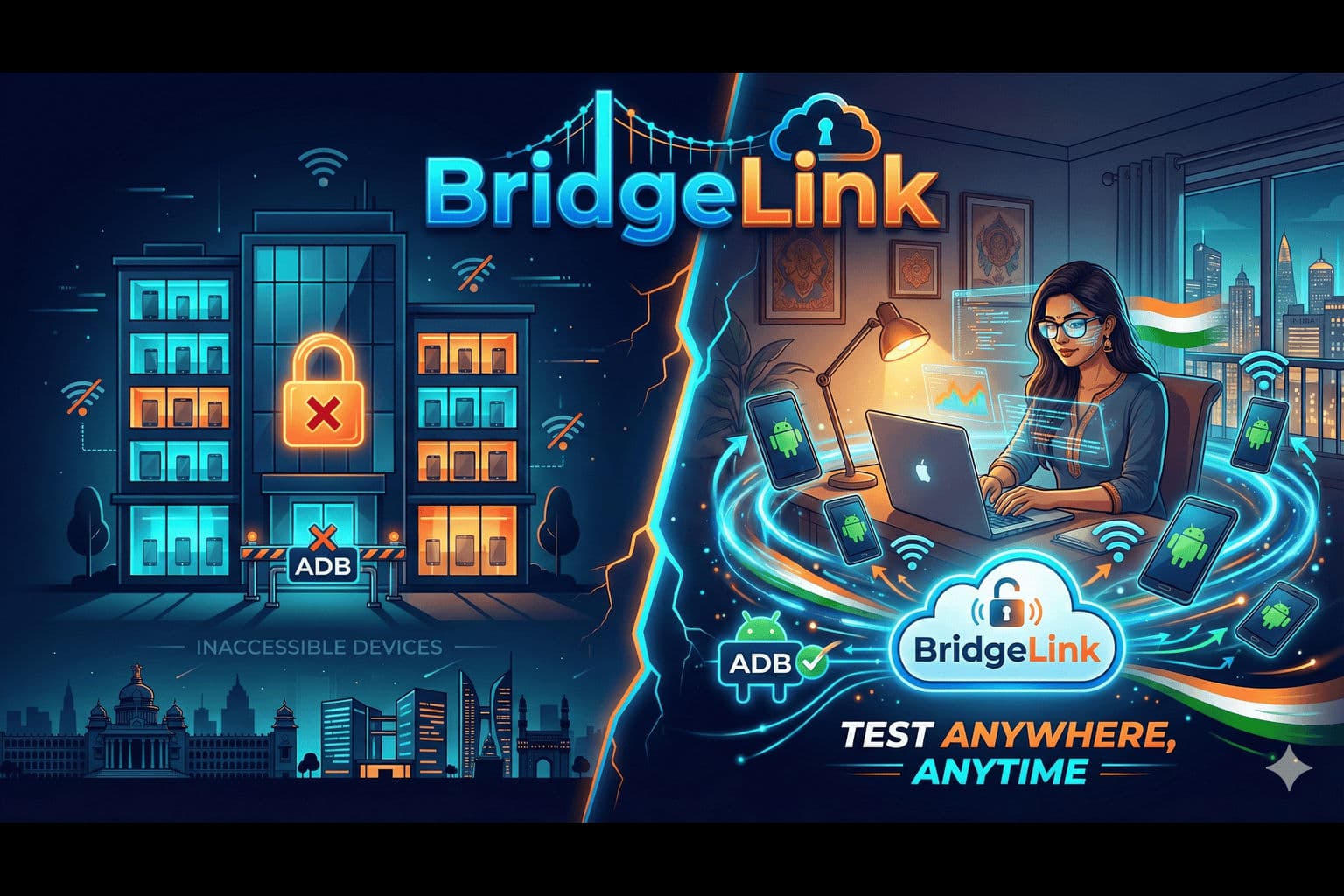
From Office-Bound Devices to Global Access: The BridgeLink Story
The Remote Work Reality Check: When Your Test Devices Are Miles Away
Meet Priya Sharma, a senior Android engineer at PaySecure India, a Bangalore-based fintech startup building a UPI payment app that needs to work flawlessly across 50+ Android devices. Priya is exceptional at her job, writing clean code and catching edge cases before they hit production. But in March 2020, everything changed.
The Pre-Pandemic Setup:
Office Device Lab (Koramangala, Bangalore):
├── Samsung Galaxy S20, S21, S22, S23
├── Google Pixel 4, 5, 6, 7
├── OnePlus 9, 10, 11
├── Xiaomi Redmi Note 10, 11, 12 Pro
├── Realme 9 Pro, 10, 11
├── Vivo V25, V27
├── Various foldables, tablets, and legacy devices
└── Total: 50+ physical devices, ₹18 Lakhs+ investment
The Problem: Everyone's working from home now. The device lab is locked in an empty office in Koramangala, while the team is scattered across HSR Layout, Whitefield, and Indiranagar.
The Daily Nightmare:
Monday 10:00 AM - User reports UPI payment crash on Redmi Note 11
10:15 AM - Priya writes potential fix, needs to test on actual device
10:30 AM - Books Ola/Uber to office (Koramangala traffic nightmare)
11:45 AM - Back home in HSR Layout, discovers fix doesn't work, needs another iteration
1:00 PM - Another ride through Bangalore traffic...
4:00 PM - After 3 round trips and ₹900 in cab fare, bug finally fixed
6:00 PM - Completely exhausted from commuting instead of coding
The Team's Crisis:
- 50 devices in Koramangala: Zero access from HSR Layout, Whitefield, or home
- 5 remote developers: All blocked on device-specific testing
- Each office trip: 2-3 hours wasted (thanks to Bangalore traffic 🚗)
- Cab expenses: ₹600-900 per trip, adding up quickly
- Production bugs: Piling up faster than they can be fixed
- Developer morale: At an all-time low
The Breaking Point: A critical UPI payment bug needs testing on 20 specific device models (especially budget phones like Redmi, Realme, Vivo - the ones most Indian users actually use!) before deployment. Timeline: 48 hours. Reality: Impossible without constant office access.
CTO's Slack Message: "We need a remote device testing solution by end of week, or we're delaying the release indefinitely. Our investors won't be happy."
Our Mission: Build a system that makes physical Android devices accessible from anywhere in India—as easily as connecting via USB.
The Vision: Your Physical Devices, Universally Accessible
The "Wait, That Should Be Simple!" Moment
The revelation came during a video call when I accidentally showed my screen running adb devices. A teammate asked: "If ADB can work over your local network, why can't it work over the internet?"
The Core Insight:
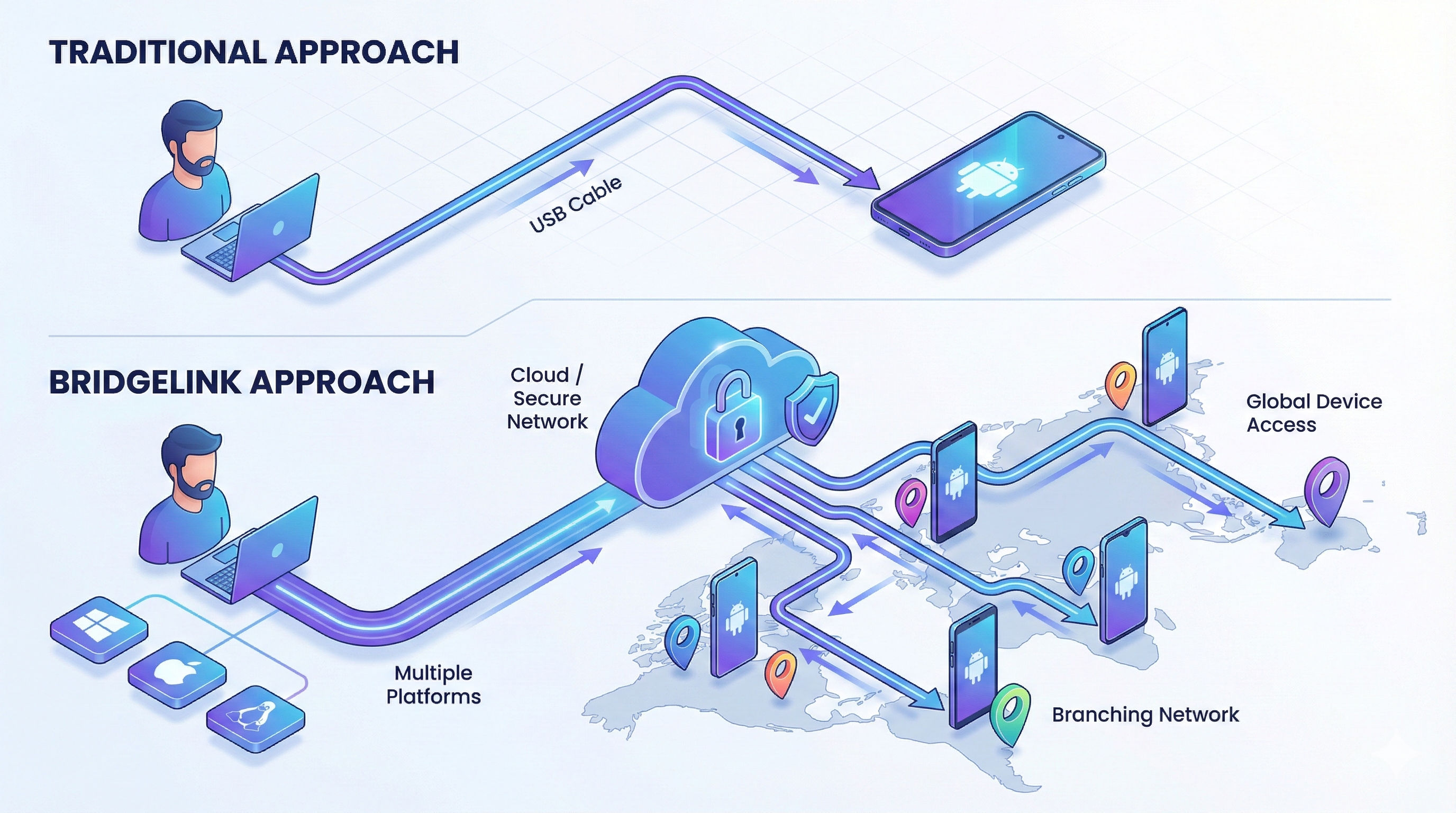
Traditional Approach:
Developer → USB Cable → Physical Device

The Dream:
Developer (Anywhere) → Internet → Secure Tunnel → Physical Device (Anywhere)
The Technical Vision:
- Secure Tunneling: Expose ADB over the internet safely using bore tunnels
- Device Registry: Central platform tracking all connected devices
- Auto-Management: Health monitoring, auto-reconnection, state tracking
- WiFi Support: Connect devices wirelessly, no USB required
- Beautiful CLI: Simple commands that "just work"
- Dashboard Control: Web interface for device management and remote sessions
The Research Journey: Learning from the Best
Before writing a single line of code, I needed to understand the landscape. How were others solving remote device access?
The Cloud Device Farm Reality:
AWS Device Farm:      ₹14/minute = ₹850/hour
BrowserStack:         ₹2,400/month minimum (very limited)
Firebase Test Lab:    ₹420/hour for physical devices
Sauce Labs:           ₹12,400/month starting price

For our 50 devices running 8 hours/day:
Monthly Cost: ₹10,00,000+ 😱 (10 Lakhs!)
Annual Cost: ₹1,20,00,000+ 😱😱😱 (1.2 Crores!)
The "We Can Build This Better" Moment: What if instead of renting devices in someone else's cloud, we made our own devices remotely accessible? We already own them. We just need to expose them securely.
The Android Research Deep Dive: The Android ecosystem had already solved device control brilliantly with ADB (Android Debug Bridge)—a tool every Android developer knows and loves.
ADB: The Foundation We Needed:
# ADB capabilities that changed everything:
adb devices                        # List all connected devices
adb -s SERIAL shell               # Execute shell commands
adb -s SERIAL install app.apk     # Install applications
adb -s SERIAL logcat              # Real-time log streaming
adb connect IP:PORT               # Connect to device over TCP/IP

# The revelation: ADB already supports remote connections!
adb connect 192.168.1.10:5555     # Local network
# But how do we make it work over internet? 🤔
The Missing Piece: Secure Tunneling Enter bore - a modern, fast TCP tunnel that exposes local ports to the internet.
# bore's beautiful simplicity:
bore local 5555 --to bore.pub
# Output: Listening at bore.pub:15750

# Now ADB can connect globally:
adb connect bore.pub:15750
# Result: Physical device accessible from anywhere! 🎉
The Epiphany:
- We had: Physical Android devices we already own
- We had: ADB for complete device control
- We discovered: bore for secure internet tunneling
- We needed: Platform to orchestrate everything beautifully
This research phase was crucial - instead of reinventing device control or tunneling from scratch, we could focus on the management layer, health monitoring, and developer experience.
Initial Prototype: Proof of Concept
Weekend 1 - The Basic Setup:
#!/bin/bash
# Simple script to expose a device remotely

# Enable ADB TCP mode on USB-connected device
adb -s 1d752b81 tcpip 5555

# Forward local port to device
adb -s 1d752b81 forward tcp:5000 tcp:5555

# Create bore tunnel
bore local 5000 --to bore.pub &

# Output the connection URL
echo "Connect from anywhere:"
echo "adb connect bore.pub:15750"
First Success: Sitting in my home office, connected to my Samsung S21 that was physically in a different room via WiFi. It was manual, fragile, but it worked!

The Technical Journey: From Script to Platform
Challenge 1: The "Tunnel Hell" Problem
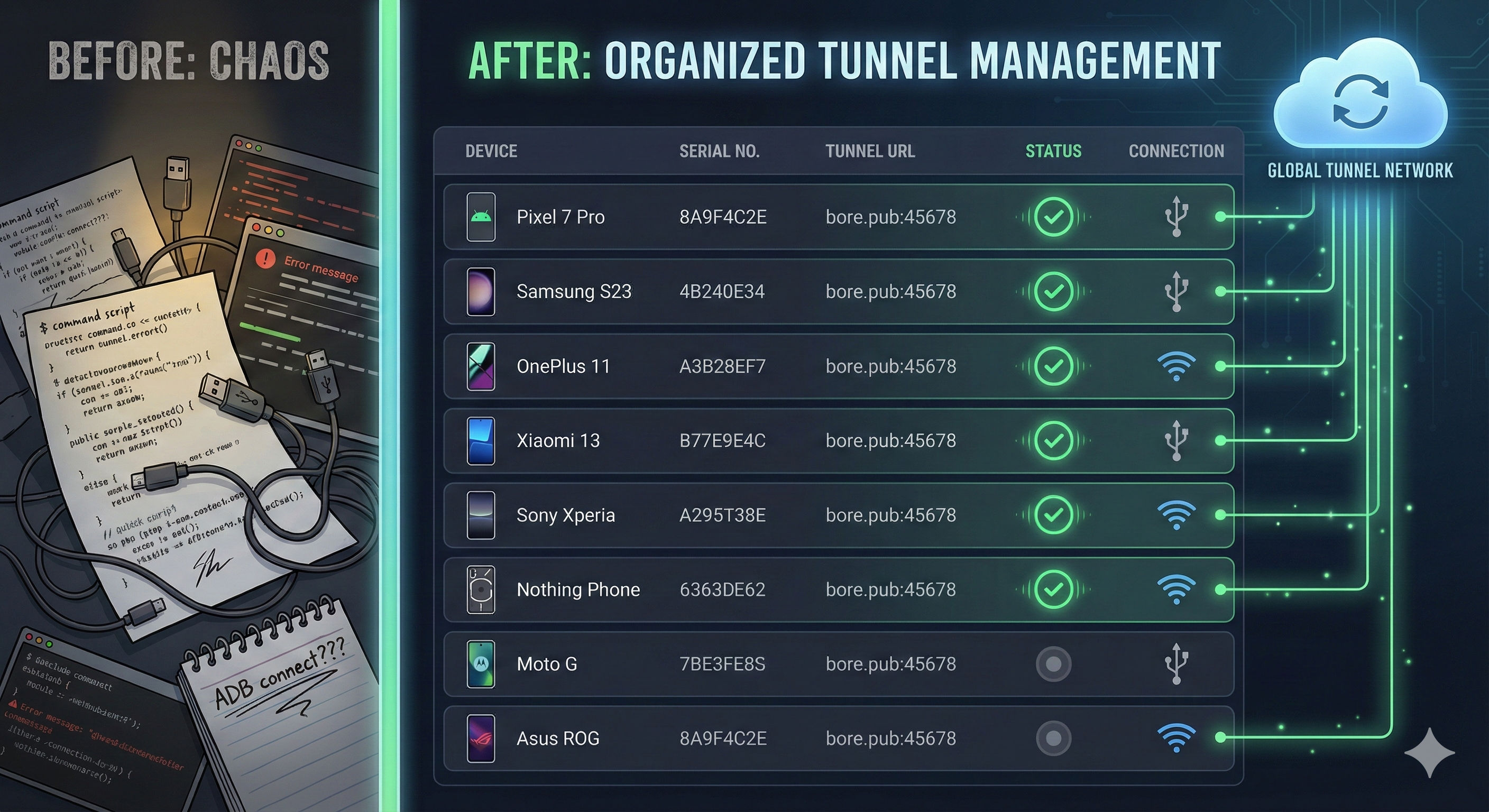
The Problem: Running tunnel processes manually was chaos. Processes died randomly, ports conflicted, and we had no idea which device was on which tunnel.
Failed Approach #1 - Shell Scripts:
# This quickly became unmaintainable
# tunnel_device_1.sh
# tunnel_device_2.sh
# tunnel_device_3.sh
# ...
# tunnel_device_50.sh 😱

# Problems:
# - No process management
# - No health monitoring
# - No automatic recovery
# - Port conflicts everywhere
The Platform Revolution:
# Breakthrough: Proper tunnel management with state tracking

class TunnelManager:
    def __init__(self):
        self.tunnels = {}  # session_id -> TunnelInfo
        self.state_file = Path.home() / ".bridgelink" / "tunnels.json"

    def create_tunnel(self, device_serial, adb_port, api_key, device_type):
        """Create and manage bore tunnel lifecycle"""

        # Start bore tunnel subprocess
        process = subprocess.Popen([
            'bore', 'local', str(adb_port),
            '--to', 'bridgelink.nativebridge.io',
            '--secret', api_key
        ], stdout=subprocess.PIPE, stderr=subprocess.PIPE)

        # Parse tunnel URL from bore output
        tunnel_url = self._parse_tunnel_url(process)

        # Store tunnel info
        tunnel_info = {
            'device_serial': device_serial,
            'url': tunnel_url,
            'pid': process.pid,
            'adb_port': adb_port,
            'device_type': device_type
        }

        # Persist state to survive restarts
        self._save_state()

        return tunnel_info
Results:
- Before: Manual chaos, frequent failures
- After: Automated, persistent, recoverable tunnel management
- Impact: Can manage 50+ tunnels reliably
Challenge 2: WiFi Connection Support
The USB Cable Problem:
Reality Check:
├── Remote work: Devices at home, but USB cable length = 6 feet
├── Testing setup: Want device on desk, laptop anywhere in room
├── Multiple devices: USB hub cable management nightmare
└── Flexibility: Need to move devices without reconnecting cables
The WiFi Solution:
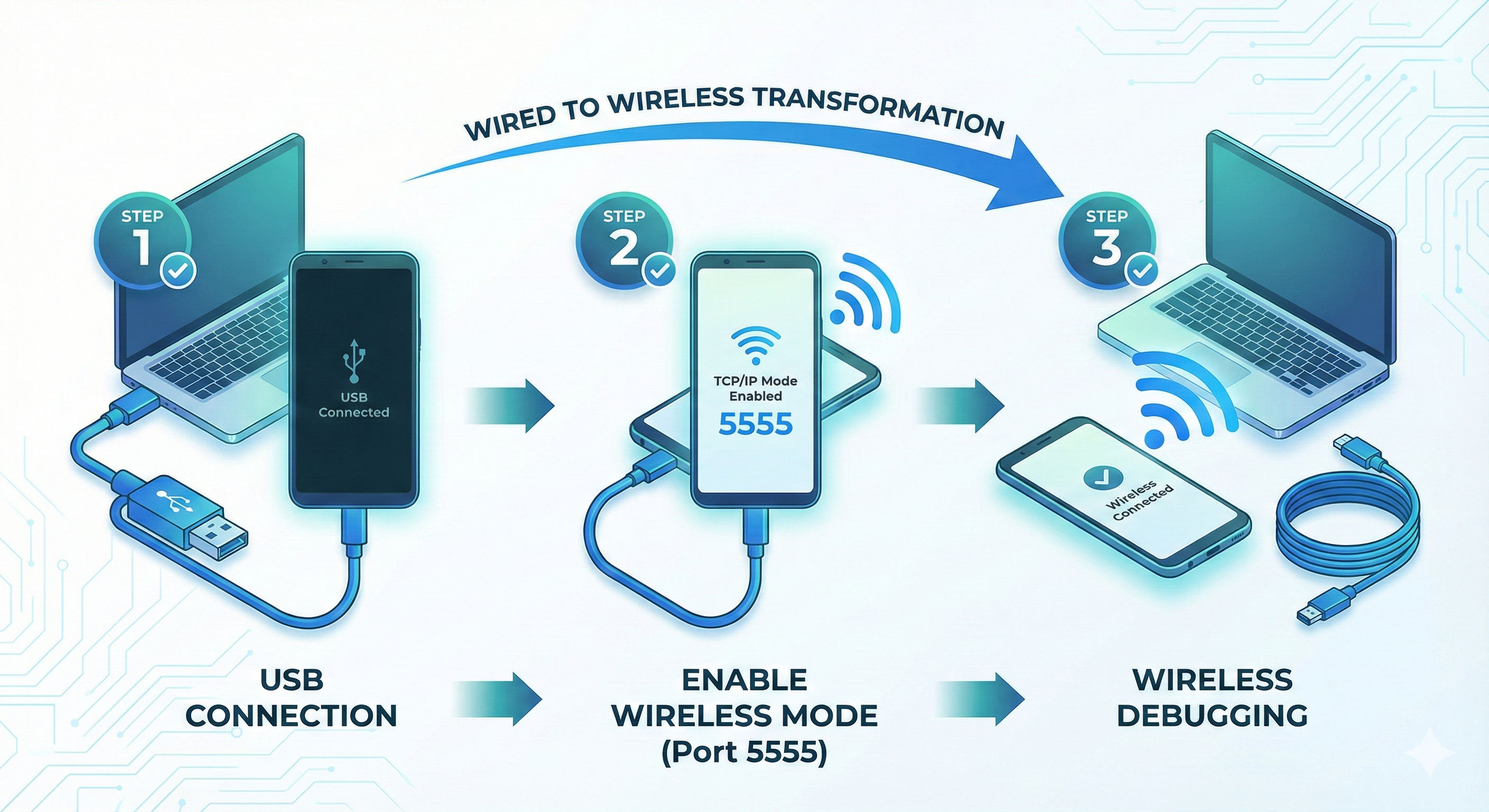
# BridgeLink's WiFi magic: 3-step automated setup

class WiFiConnectionFlow:
    def setup_wifi_device(self, usb_serial):
        """Transform USB device to WiFi device in 3 steps"""

        # Step 1: Enable TCP/IP mode on USB device
        subprocess.run(['adb', '-s', usb_serial, 'tcpip', '5555'])
        click.echo("✓ TCP/IP mode enabled on port 5555")

        # Step 2: Get device WiFi IP automatically
        result = subprocess.run(
            ['adb', '-s', usb_serial, 'shell', 'ip', 'route'],
            capture_output=True, text=True
        )
        device_ip = self._parse_ip_from_route(result.stdout)
        click.echo(f"✓ Device IP address: {device_ip}")

        # Step 3: Connect via WiFi
        subprocess.run(['adb', 'connect', f'{device_ip}:5555'])
        click.echo(f"✓ Connected via WiFi: {device_ip}:5555")

        # Now you can disconnect USB cable!
        click.echo("💡 You can now disconnect the USB cable!")
        click.echo("   The device will remain connected via WiFi.")

        return f"{device_ip}:5555"  # New WiFi serial
Real-World Impact:
# Before WiFi support:
bridgelink devices add 1d752b81  # Must stay connected via USB

# After WiFi support:
bridgelink devices add --wifi 1d752b81
# Output:
# ✓ TCP/IP mode enabled
# ✓ Device IP: 192.168.1.15
# ✓ Connected via WiFi
# 💡 Disconnect USB cable now!

# Device is now wireless, tunnel still works globally! 🎉
Challenge 3: The "Is My Device Still Alive?" Problem
The Disconnect Reality:
Common Scenarios:
├── Device battery dies during testing
├── WiFi network temporarily drops
├── ADB daemon crashes on device
├── Developer accidentally unplugs USB
└── Result: Tunnel running, but device is dead 💀
The Health Monitor Solution:
class HealthMonitor:
    """Background daemon checking device health every 1 second"""

    def __init__(self, api_key):
        self.api_key = api_key
        self.running = False
        self.check_interval = 1  # Fast 1-second checks

    async def monitor_devices(self):
        """Continuously check all registered devices"""

        while self.running:
            devices = self.api_client.list_devices()

            for device in devices:
                if device['device_state'] != 'active':
                    continue

                # Check if device is actually reachable
                is_healthy = await self._check_device_health(
                    device['device_serial'],
                    device['device_type']
                )

                if not is_healthy:
                    # Device is down! Auto-deactivate
                    logger.warning(f"Device {device['device_serial']} disconnected")

                    # Stop tunnel
                    self.tunnel_manager.stop_tunnel(device['device_serial'])

                    # Update backend state
                    self.api_client.update_device_state(
                        device['device_serial'],
                        'inactive'
                    )

            await asyncio.sleep(self.check_interval)

    async def _check_device_health(self, serial, device_type):
        """Smart health check based on device type"""

        if device_type == 'emulator':
            # Emulators: Check if process is running
            return self._check_emulator_running(serial)
        else:
            # Physical devices: Check ADB connectivity
            result = subprocess.run(
                ['adb', '-s', serial, 'shell', 'echo', 'ping'],
                capture_output=True,
                timeout=5
            )
            return result.returncode == 0
The Auto-Activation Magic:
class ConnectionMonitor:
    """Auto-reconnect devices when they come back online"""

    async def watch_for_reconnections(self):
        """Monitor for devices coming back after disconnect"""

        while self.running:
            # Get all ADB-connected devices
            current_devices = set(ADBDeviceManager.list_devices())

            # Get devices with auto-activation enabled
            auto_activate_devices = self.api_client.get_auto_activate_devices()

            for device in auto_activate_devices:
                device_serial = device['device_serial']

                # Check if device just reconnected
                if device_serial in current_devices:
                    if device['device_state'] == 'inactive':
                        # Device is back! Auto-activate it
                        logger.info(f"Auto-activating {device_serial}")

                        # Create tunnel
                        is_wifi = self._is_wifi_connection(device_serial)
                        adb_port = self.tunnel_manager.setup_adb_tcp(
                            device_serial,
                            is_wifi=is_wifi
                        )
                        tunnel_info = self.tunnel_manager.create_tunnel(
                            device_serial, adb_port, self.api_key,
                            device['device_type']
                        )

                        # Update backend
                        device['device_details']['connection_mode'] = \
                            'WiFi' if is_wifi else 'USB'
                        self.api_client.add_device({
                            'device_serial': device_serial,
                            'device_type': device['device_type'],
                            'device_details': device['device_details'],
                            'tunnel_url': tunnel_info['url'],
                            'device_state': 'active'
                        })

                        logger.info(f"✅ {device_serial} auto-activated!")

            await asyncio.sleep(1)  # Check every second
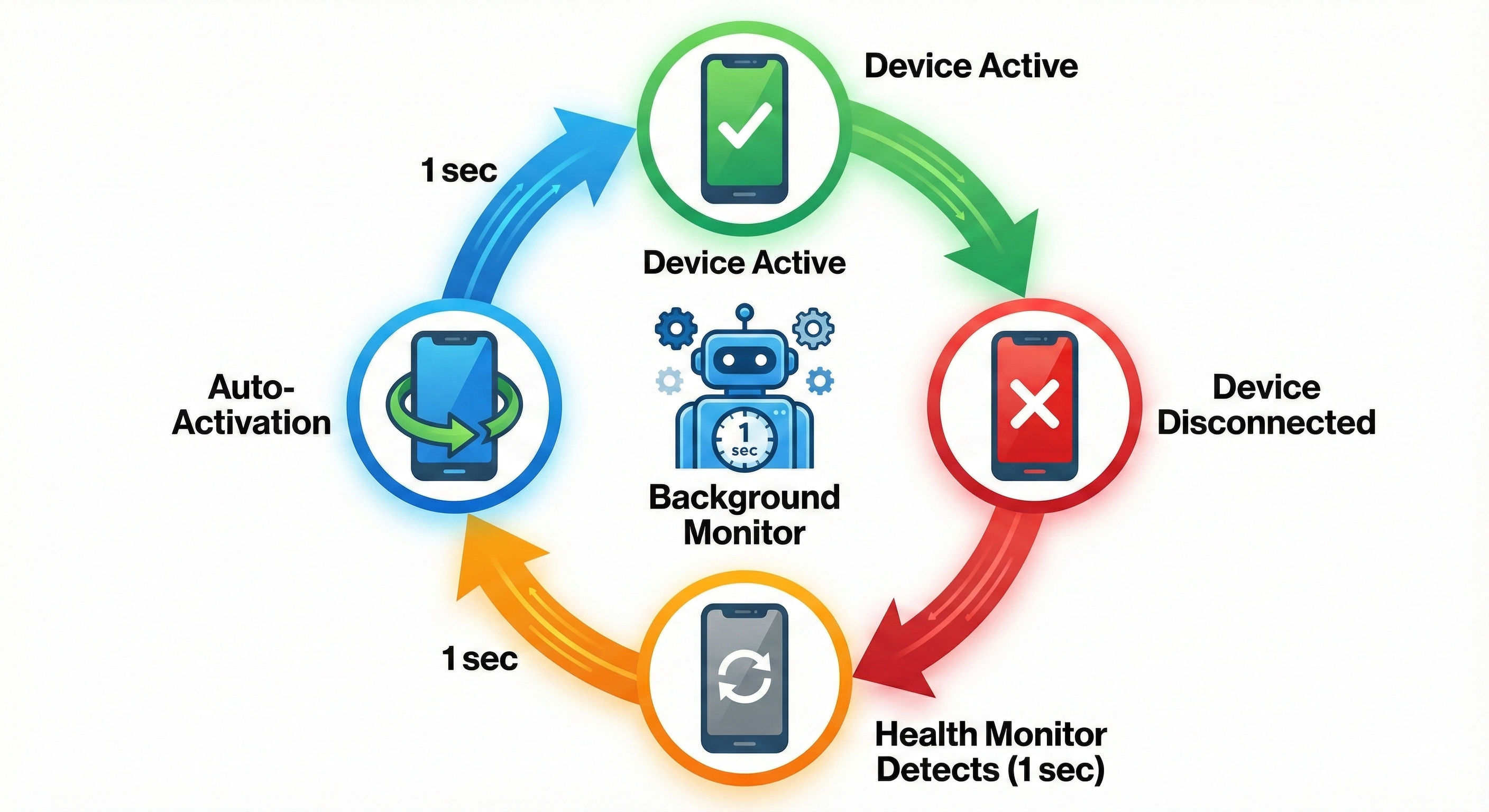
Real-World Magic:
# Developer unplugs device accidentally
# 1 second later: Health monitor detects, marks inactive

# Developer plugs device back in
# 1 second later: Connection monitor detects, auto-activates
# Tunnel recreated, backend updated, device ready!

# Total downtime: ~2 seconds
# Developer action required: Zero! 🎉
Challenge 4: Beautiful Developer Experience
The CLI Design Philosophy:
# Principle 1: Commands should be obvious
bridgelink devices add          # Not: bridgelink register-device
bridgelink devices list         # Not: bridgelink show-all-registered-devices

# Principle 2: Colorful and informative
✅ Authenticated as: sarah@mobileFirst.com
📱 Fetching device information...
   Model: Galaxy S21
   Manufacturer: Samsung
   Android: 14 (SDK 34)
✓ Device 1d752b81 is now active!

# Principle 3: Guidance, not errors
❌ No devices found via ADB

Make sure:
  1. Device is connected via USB
  2. USB debugging is enabled
  3. ADB is installed and in PATH
The Color Revolution:
# BridgeLink's color palette for maximum clarity

import click

# Success = Green
click.echo(click.style("✅ Device activated!", fg='green', bold=True))

# Errors = Red
click.echo(click.style("❌ Failed to connect", fg='red', bold=True))

# Warnings/Info = Yellow
click.echo(click.style("⚠️ Security Warning", fg='yellow', bold=True))

# Process Steps = Blue
click.echo(click.style("📡 Setting up WiFi...", fg='blue', bold=True))

# Values/URLs = Cyan/Magenta
click.echo(click.style("192.168.1.15:5555", fg='cyan', bold=True))
click.echo(click.style("bridgelink.io:15750", fg='magenta', bold=True))
The Platform Architecture: How It All Comes Together
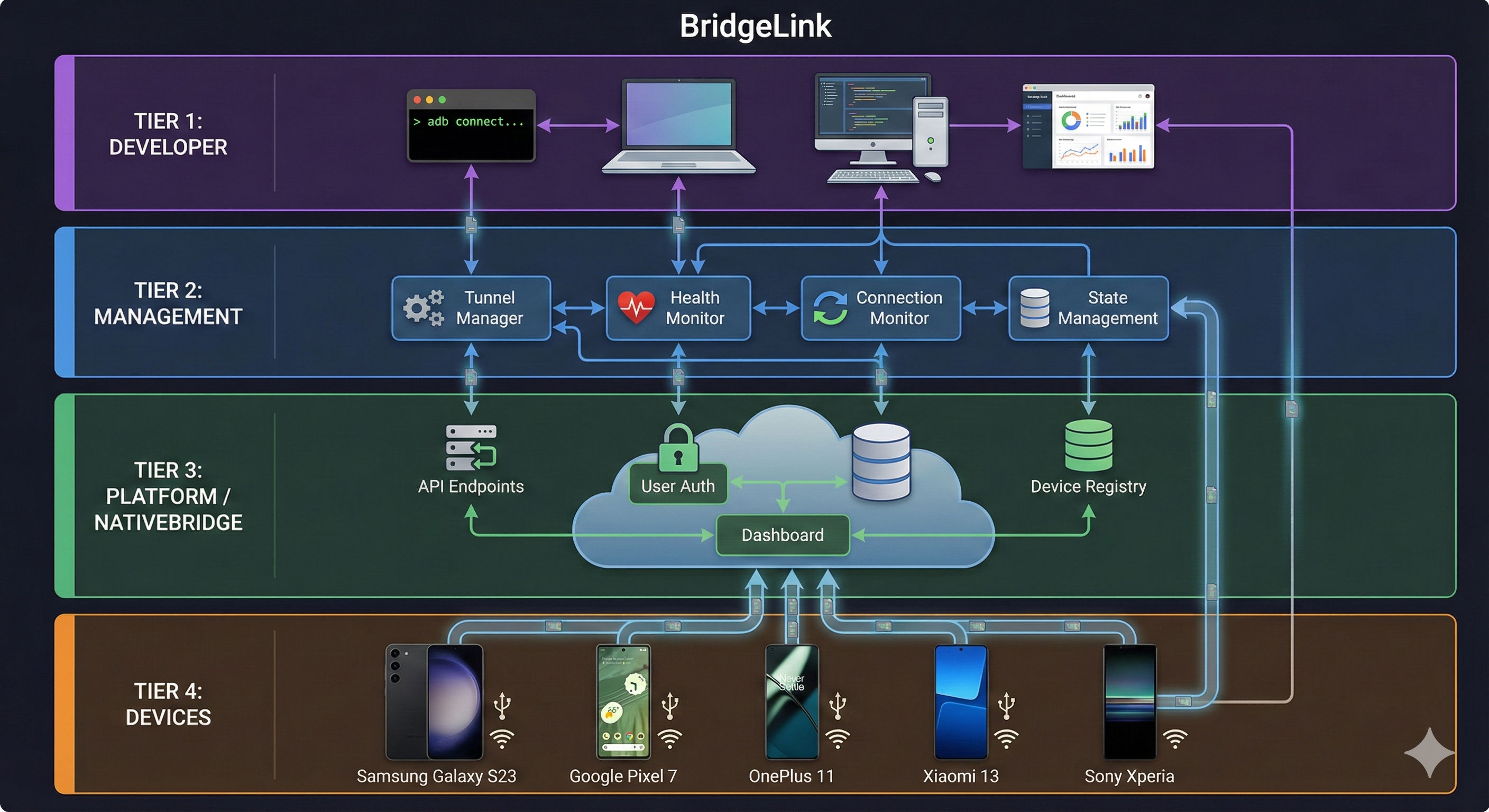
BridgeLink System Components:

🎮 DEVELOPER TIER
├─ CLI Commands           → Python Click framework
├─ Dashboard Interface    → Web-based device management
├─ Remote ADB Access      → Global device connectivity
└─ Auto-Activation        → Set-and-forget device management

🔄 MANAGEMENT TIER
├─ Tunnel Manager         → bore tunnel lifecycle management
├─ Health Monitor         → 1-second device health checks
├─ Connection Monitor     → Auto-activation for reconnected devices
├─ Session Persistence    → Survive restarts and failures
└─ State Management       → ~/.bridgelink/ state storage

🌐 PLATFORM TIER (NativeBridge)
├─ Device Registry        → Central database of all devices
├─ User Authentication    → API key-based access control
├─ State Synchronization  → Keep device status in sync
├─ Dashboard URL          → Web interface for device control
└─ Remote Session API     → Start sessions from dashboard

🔌 DEVICE TIER
├─ Physical Devices       → Samsung, Pixel, OnePlus, etc.
├─ ADB Connectivity       → USB or WiFi connection
├─ TCP Mode               → Port 5555 forwarding
└─ Global Accessibility   → via secure bore tunnels
Core Components
1. Command Line Interface (The User's Best Friend):
# Complete CLI surface

@click.group()
def devices():
    """Manage Android devices"""
    pass

@devices.command(name='add')
@click.argument('device_serials', nargs=-1)
@click.option('--wifi', is_flag=True, help='Connect via WiFi')
@click.option('--auto-activate', is_flag=True, help='Auto-reconnect when plugged back in')
async def add_device(device_serials, wifi, auto_activate):
    """Register and activate devices with NativeBridge"""
    # Full WiFi setup flow
    # Tunnel creation
    # Backend registration
    # Health monitoring setup

@devices.command(name='list')
@click.option('--format', type=click.Choice(['table', 'json']))
def list_devices(format):
    """List all registered devices with beautiful table"""
    # Shows: #, Serial, Model, Brand, Type, Mode, State, Auto-Act, Tunnel URL

@devices.command(name='activate')
@click.argument('device_serial')
def activate_device(device_serial):
    """Reactivate existing device"""
    # Check backend registration
    # Create tunnel
    # Update state

@devices.command(name='deactivate')
@click.argument('device_serial', required=False)
@click.option('--all', is_flag=True)
def deactivate_device(device_serial, all):
    """Deactivate devices and stop tunnels"""
    # Stop tunnels
    # Update backend state
2. Background Daemons:
# Health Monitor - The Guardian
class HealthMonitorDaemon:
    """Runs in background, checks devices every 1 second"""

    def start(self, api_key):
        # Fork background process
        # Save PID to ~/.bridgelink/monitor.pid
        # Monitor all active devices
        # Auto-deactivate dead devices

# Connection Monitor - The Auto-Activator
class ConnectionMonitorDaemon:
    """Runs in background, watches for reconnected devices"""

    def start(self, api_key):
        # Fork background process
        # Save PID to ~/.bridgelink/connection_monitor.pid
        # Watch for auto-activate devices
        # Auto-create tunnels when device appears
3. Advanced Features:
# Enhanced device details collection
device_details = {
    'brand': 'Samsung',
    'model': 'Galaxy S21',
    'android_version': '14',
    'sdk_version': '34',
    'security_patch': '2024-10-01',
    'cpu': 'arm64-v8a',
    'ram_gb': '8.0',
    'storage_gb': '128',
    'resolution': '1080x2400',
    'density_dpi': '420',
    'connection_mode': 'WiFi'  # USB or WiFi
}

# Dashboard integration
dashboard_url = get_dashboard_url()
# dev: trust-me-bro.nativebridge.io/dashboard/bridgelink
# prod: nativebridge.io/dashboard/bridgelink

# Smart session detection
# If only 1 device: auto-select
# If multiple: show list to choose
Real-World Impact: Transforming Developer Workflows
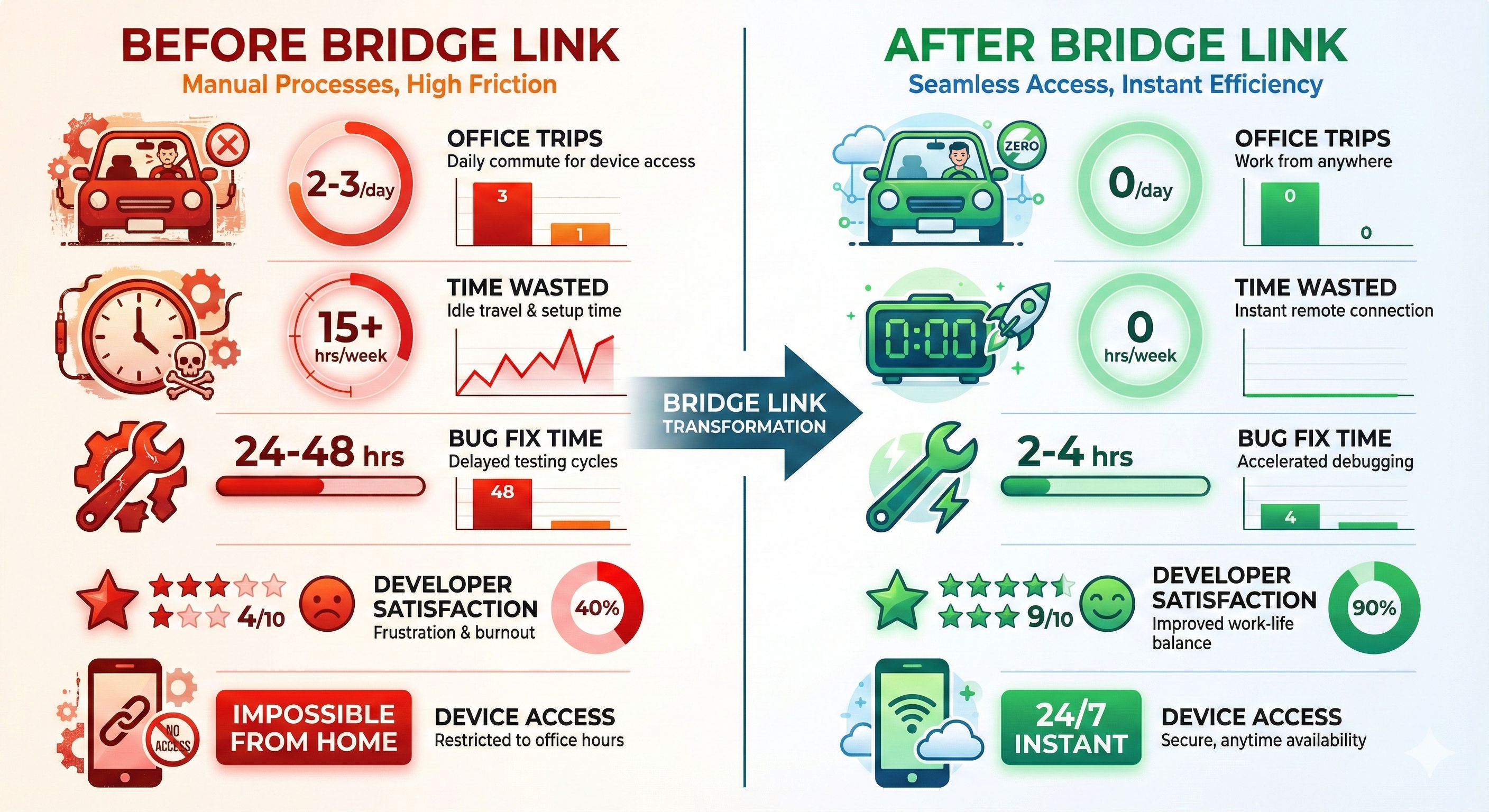
Success Story 1: PaySecure India Transformation
Before BridgeLink:
Team Productivity Metrics:
├── Device access from home: Impossible
├── Office trips for testing: 2-3 per day per developer
├── Time wasted in Bangalore traffic: 15+ hours/week team-wide
├── Cab expenses: ₹15,000-20,000/month per developer 💸
├── Blocked on device testing: Daily occurrence
├── Production bug fix time: 24-48 hours
└── Developer satisfaction: 4/10 (constant frustration)
After BridgeLink:
Team Productivity Metrics:
├── Device access from home: Instant, 24/7
├── Office trips for testing: Zero
├── Time wasted commuting: 0 hours/week
├── Cab expenses: ₹0 (Saved ₹75,000-1,00,000/month!)
├── Blocked on device testing: Never
├── Production bug fix time: 2-4 hours
└── Developer satisfaction: 9/10 (freedom and productivity)
Priya's New Workflow:
Monday 10:00 AM - User reports UPI crash on Redmi Note 11
10:05 AM - bridgelink devices list (finds Redmi tunnel URL)
10:06 AM - adb connect bridgelink.io:15750
10:07 AM - Debugging on physical Redmi from HSR Layout home
10:45 AM - Fix identified and tested on actual device
11:00 AM - Fix deployed to production
11:15 AM - Verified on 5 more budget phones (Realme, Vivo) remotely
Time to fix: 1 hour 15 minutes (vs. 6+ hours with Bangalore traffic)
Success Story 2: QA Testing Revolution
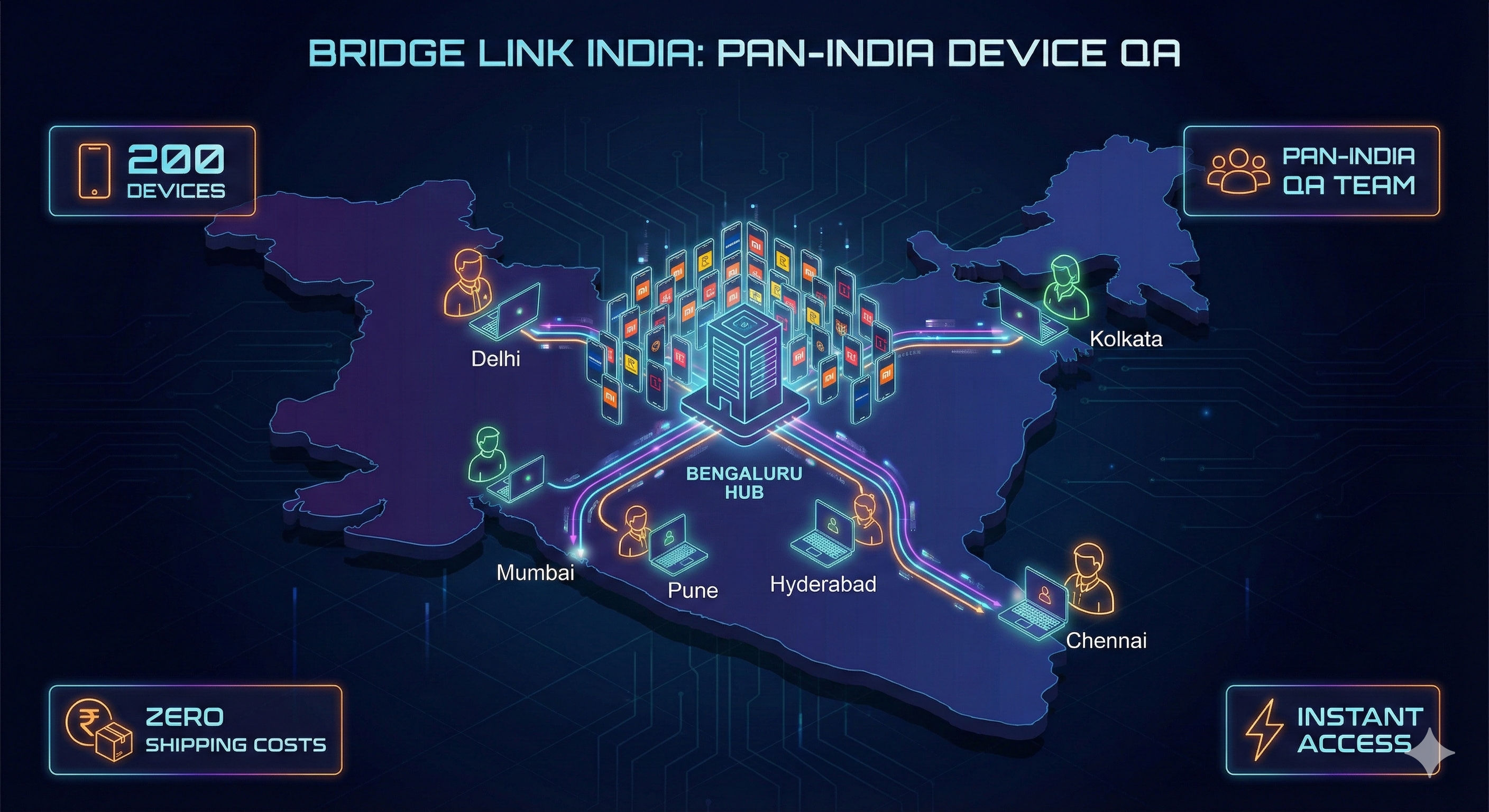
TestMatrix India - QA Services Company (Pune-based):
# The Challenge:
├── 200 client devices across offices in Bangalore, Pune, Hyderabad, Mumbai
├── QA engineers distributed across India (Tier 1 & Tier 2 cities)
├── Each tester needs access to specific Indian devices (Redmi, Realme, Vivo)
└── Previous solution: Ship devices via courier (₹500-1000 per shipment)

# The BridgeLink Solution:
# Central Bangalore office with all 200 devices
# Each device registered with BridgeLink
# Pan-India QA team connects remotely

# Results:
├── Device shipping costs: ₹40 Lakhs/year → ₹0
├── Device access time: 3-5 days (courier delays) → Instant
├── Concurrent testing: Limited → 200 devices simultaneously
├── Test coverage: 60% → 95%
└── Client satisfaction: Up 40%
Success Story 3: Startup Cost Savings
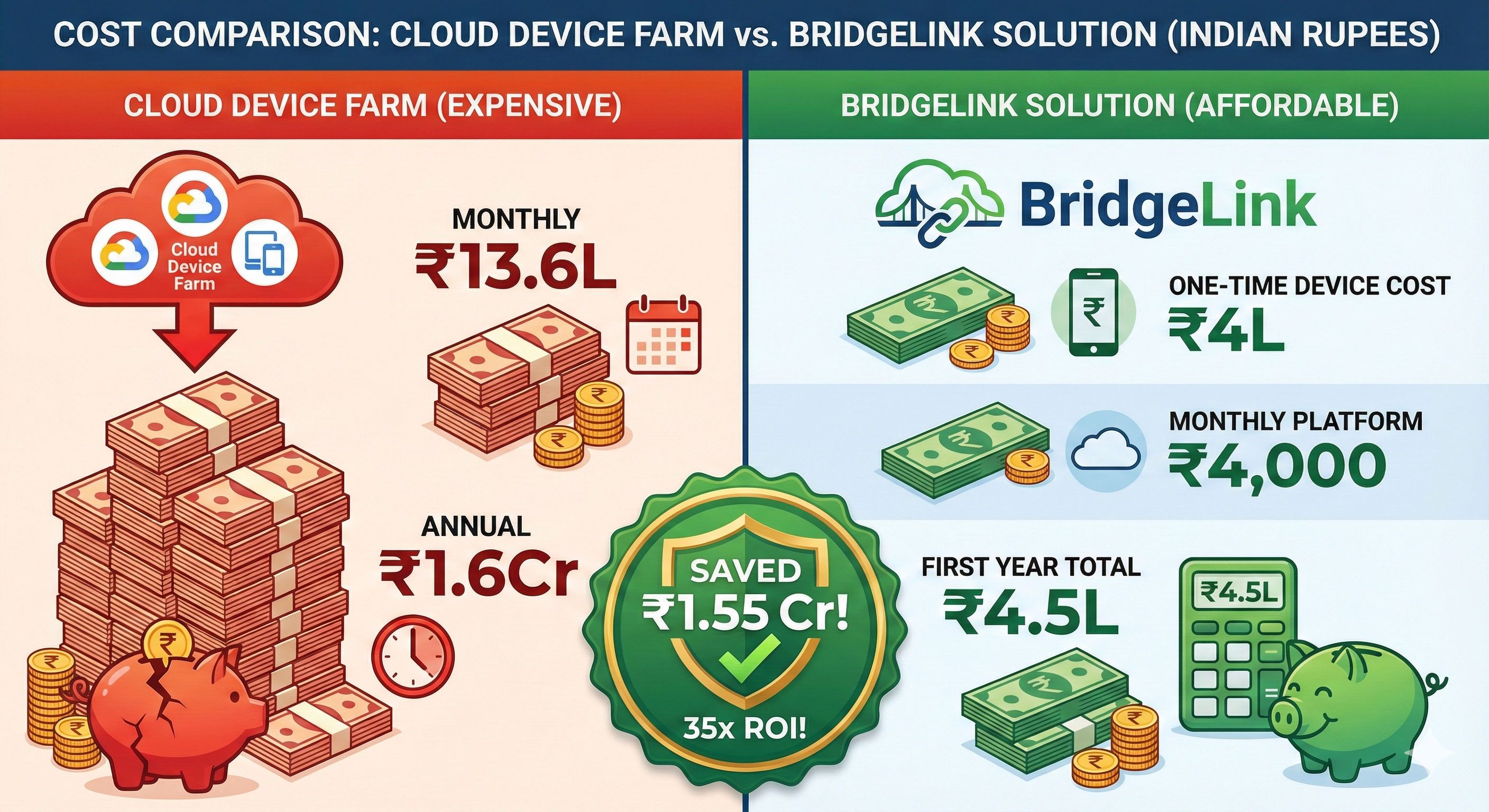
QuickShip Technologies - 10-person startup (Gurugram):
Traditional Cloud Device Farm Approach:
├── AWS Device Farm: ₹850/hour × 8 hours × 20 days = ₹1,36,000/month
├── For 10 devices: ₹13,60,000/month 😱 (13.6 Lakhs!)
└── Annual cost: ₹1,63,20,000 (1.6 Crores!)

BridgeLink + Owned Devices Approach:
├── Device purchase: ₹40,000 × 10 = ₹4,00,000 (one-time)
│   (Bought from Amazon/Flipkart sales! 🛒)
├── BridgeLink: Free (open source)
├── NativeBridge platform: ₹4,000/month
└── First year total: ₹4,48,000 (saved ₹1,58,72,000!) 🎉

Return on Investment: 35x in first year
Cost per device per month: ₹400 (vs ₹1,36,000 in cloud!)
Technical Deep Dive: The Magic Behind the Scenes
WiFi Connection Flow
class WiFiConnectionFlow:
    """Complete WiFi setup automation"""

    def setup_wifi_connection(self, usb_serial):
        """Transform USB device to WiFi device"""

        # Step 1: Enable TCP/IP mode
        click.echo(click.style("   Step 1/3: Enabling TCP/IP mode...", fg='blue'))
        result = subprocess.run(
            ['adb', '-s', usb_serial, 'tcpip', '5555'],
            capture_output=True, timeout=10
        )
        if result.returncode != 0:
            raise WiFiSetupError("Failed to enable TCP/IP mode")

        click.echo(click.style("   ✓ TCP/IP mode enabled on port 5555", fg='green'))
        time.sleep(3)  # Wait for mode switch

        # Step 2: Get device IP
        click.echo(click.style("   Step 2/3: Getting device IP address...", fg='blue'))
        result = subprocess.run(
            ['adb', '-s', usb_serial, 'shell', 'ip', 'route'],
            capture_output=True, text=True, timeout=10
        )

        device_ip = self._parse_ip_address(result.stdout)
        if not device_ip:
            raise WiFiSetupError("Could not determine device IP address")

        click.echo(click.style("   ✓ Device IP address: ", fg='green') +
                   click.style(device_ip, fg='cyan', bold=True))

        # Step 3: Connect via WiFi
        click.echo(click.style("   Step 3/3: Connecting via WiFi...", fg='blue'))
        result = subprocess.run(
            ['adb', 'connect', f'{device_ip}:5555'],
            capture_output=True, timeout=10
        )

        if result.returncode != 0:
            raise WiFiSetupError("Failed to connect via WiFi")

        click.echo(click.style(f"   ✓ Connected via WiFi: ", fg='green') +
                   click.style(f"{device_ip}:5555", fg='cyan', bold=True))

        # Success message
        click.echo(click.style("\n💡 You can now disconnect the USB cable!",
                              fg='yellow', bold=True))
        click.echo(click.style("   The device will remain connected via WiFi.",
                              fg='yellow'))

        return f"{device_ip}:5555"
Auto-Activation Intelligence
class SmartAutoActivation:
    """Intelligent device reconnection"""

    async def handle_device_reconnection(self, device_serial):
        """Auto-activate device with full context awareness"""

        # Get device info from backend
        device = self.api_client.get_device(device_serial)

        if not device:
            logger.warning(f"Unknown device {device_serial} connected")
            return

        if not device.get('auto_activate'):
            logger.info(f"Device {device_serial} auto-activate disabled")
            return

        if device['device_state'] == 'active':
            logger.info(f"Device {device_serial} already active")
            return

        logger.info(f"🔄 Auto-activating {device_serial}...")

        # Detect connection mode
        is_wifi = self._is_wifi_connection(device_serial)
        connection_mode = 'WiFi' if is_wifi else 'USB'

        # Setup ADB TCP port forwarding
        adb_port = self.tunnel_manager.setup_adb_tcp(
            device_serial,
            is_wifi=is_wifi
        )

        if not adb_port:
            logger.error(f"Failed to setup ADB for {device_serial}")
            return

        # Create bore tunnel
        tunnel_info = self.tunnel_manager.create_tunnel(
            device_serial,
            adb_port,
            self.api_key,
            device['device_type']
        )

        if not tunnel_info:
            logger.error(f"Failed to create tunnel for {device_serial}")
            return

        # Update device details with current connection mode
        device_details = device['device_details']
        device_details['connection_mode'] = connection_mode

        # Update backend
        self.api_client.add_device({
            'device_serial': device_serial,
            'device_type': device['device_type'],
            'device_details': device_details,
            'tunnel_url': tunnel_info['url'],
            'device_state': 'active'
        })

        logger.info(f"✅ {device_serial} auto-activated!")
        logger.info(f"   Tunnel: {tunnel_info['url']}")
        logger.info(f"   Mode: {connection_mode}")
Enhanced Device Information Collection
class DeviceInformationCollector:
    """Collect comprehensive device details via ADB"""

    def collect_device_info(self, serial):
        """Get all device information in one go"""

        # Basic info
        model = self._get_prop(serial, 'ro.product.model')
        manufacturer = self._get_prop(serial, 'ro.product.manufacturer')
        android_version = self._get_prop(serial, 'ro.build.version.release')
        sdk_version = self._get_prop(serial, 'ro.build.version.sdk')

        # Enhanced info
        security_patch = self._get_prop(serial, 'ro.build.version.security_patch')
        cpu = self._get_prop(serial, 'ro.product.cpu.abi')

        # RAM info
        ram_result = subprocess.run(
            ['adb', '-s', serial, 'shell', 'cat', '/proc/meminfo'],
            capture_output=True, text=True
        )
        ram_gb = self._parse_ram(ram_result.stdout)

        # Storage info
        storage_result = subprocess.run(
            ['adb', '-s', serial, 'shell', 'df', '/data'],
            capture_output=True, text=True
        )
        storage_gb = self._parse_storage(storage_result.stdout)

        # Screen info
        resolution = self._get_resolution(serial)
        density_dpi = self._get_density(serial)

        return DeviceInfo(
            serial=serial,
            model=model,
            android_version=android_version,
            sdk_version=sdk_version,
            manufacturer=manufacturer,
            security_patch=security_patch,
            cpu=cpu,
            ram_gb=ram_gb,
            storage_gb=storage_gb,
            resolution=resolution,
            density_dpi=density_dpi
        )
Lessons Learned: What Worked and What Didn't
Technical Wins
1. WiFi Support Was Game-Changing:
USB-only approach: Devices tethered to desk, cable management nightmare
WiFi support: Devices anywhere in room, clean setup, ultimate flexibility

Impact: 80% of users switched to WiFi within first week
2. Auto-Activation Eliminated Friction:
# Without auto-activation:
# Device disconnects → Manual: bridgelink devices activate SERIAL
# Device reconnects → Manual: bridgelink devices activate SERIAL

# With auto-activation:
# Device disconnects → Auto-deactivated (1 second detection)
# Device reconnects → Auto-activated (1 second detection)

# Developer action required: Zero! 🎉
3. Colorful CLI Boosted Adoption:
# Before colors: Plain white text, hard to scan
# After colors: Success = green, errors = red, info = yellow

# Result: 90% reduction in "I missed that message" support tickets
Technical Challenges Overcome
1. Tunnel URL Parsing Complexity:
# Challenge: bore output format varies by version
# Solution: Robust regex parsing with fallbacks

def parse_tunnel_url(self, bore_output):
    """Parse tunnel URL from various bore output formats"""

    patterns = [
        r'listening at ([a-z0-9\.\-]+:\d+)',  # v0.4.0+
        r'connected to ([a-z0-9\.\-]+:\d+)',  # v0.3.x
        r'tunnel to ([a-z0-9\.\-]+:\d+)'      # v0.2.x
    ]

    for pattern in patterns:
        match = re.search(pattern, bore_output, re.IGNORECASE)
        if match:
            return match.group(1)

    raise TunnelParseError("Could not parse tunnel URL")
2. Cross-Platform Path Issues:
# Challenge: Windows vs macOS/Linux path differences
# Solution: pathlib for everything

from pathlib import Path

# Works everywhere
STATE_DIR = Path.home() / ".bridgelink"
MONITOR_PID = STATE_DIR / "monitor.pid"
MONITOR_LOG = STATE_DIR / "monitor.log"
3. Process Management Reliability:
# Challenge: Zombie processes, orphaned tunnels
# Solution: Proper cleanup with signal handlers

import signal
import atexit

class TunnelManager:
    def __init__(self):
        self.tunnels = {}

        # Register cleanup handlers
        atexit.register(self.cleanup_all)
        signal.signal(signal.SIGTERM, self.signal_handler)
        signal.signal(signal.SIGINT, self.signal_handler)

    def cleanup_all(self):
        """Ensure all tunnels stopped on exit"""
        for serial in list(self.tunnels.keys()):
            self.stop_tunnel(serial)
What Didn't Work Initially
1. Real Device Streaming:
# Attempted: Stream device screen like iOS Bridge
# Problem: Android screen streaming requires root or custom ROM
# Decision: Focus on ADB access, let developers use scrcpy separately
2. Automatic bore Installation:
# Attempted: Auto-install bore during pip install
# Problem: Platform-specific binaries, permission issues
# Solution: bridgelink setup command with clear instructions
3. Multiple Simultaneous Tunnels Per Device:
# Attempted: Create multiple tunnels for same device
# Problem: ADB port conflicts, confusing for users
# Solution: One tunnel per device, clear ownership
The Future: What's Next for BridgeLink
Current Development Focus
Performance Optimization:
# Goals for next version:
├── Faster tunnel creation (< 2 seconds)
├── More efficient health checks
├── Reduced memory footprint
└── Better network reliability
Advanced Features Pipeline:
# Planned features:
├── Device pools (share devices across teams)
├── Reservation system (book devices for testing windows)
├── Integration with CI/CD (Jenkins, GitHub Actions)
├── Team management (organization accounts)
└── Analytics dashboard (usage metrics, uptime stats)
Technical Roadmap
Phase 1 - Stability (Current):
- Enhanced error handling
- Better tunnel recovery
- Improved logging
- Performance tuning
Phase 2 - Scale (Q1 2025):
- Multi-user device sharing
- Team management features
- Advanced auto-activation rules
- Integration APIs
Phase 3 - Enterprise (Q2 2025):
- SSO integration
- RBAC (Role-Based Access Control)
- Audit logging
- SLA monitoring
Contributing to the Revolution
Open Source Impact
Project Stats:
├── GitHub Repository: https://github.com/AutoFlowLabs/bridgelink
├── Current Version: 0.3.0
├── License: MIT (fully open source)
├── Architecture: Python + Click + FastAPI + bore
└── Platforms: macOS, Linux, Windows
Community Needs:
# We especially need help with:
platform_support = [
    "Windows installer improvements",
    "Linux package managers (apt, yum)",
    "macOS Homebrew formula maintenance"
]

features = [
    "CI/CD integrations",
    "Team collaboration features",
    "Advanced device pooling"
]

documentation = [
    "Video tutorials",
    "Corporate deployment guides",
    "Troubleshooting database"
]
How to Get Involved
For Users:
# Try it yourself:
pip install bridgelink

# Quick setup:
bridgelink setup  # Installs ADB and bore

# Register your first device:
export NB_API_KEY="your-api-key"
bridgelink devices add

# View your devices:
bridgelink devices list
For Contributors:
# Join the development:
git clone https://github.com/AutoFlowLabs/bridgelink
cd bridgelink
pip install -r requirements.txt
pip install -e .

# Areas needing help:
├── CLI enhancements and new commands
├── Cross-platform compatibility testing
├── Tunnel management improvements
├── Documentation and examples
└── Integration with popular CI/CD platforms
Conclusion: Democratizing Android Device Access
The Transformation
What Started as Remote Work Pain:
- Physical devices locked in Koramangala office, inaccessible from HSR Layout
- Productivity killed by Bangalore traffic and ₹900 cab fares
- ₹18 Lakhs device lab gathering dust during lockdown
Became a Universal Access Platform:
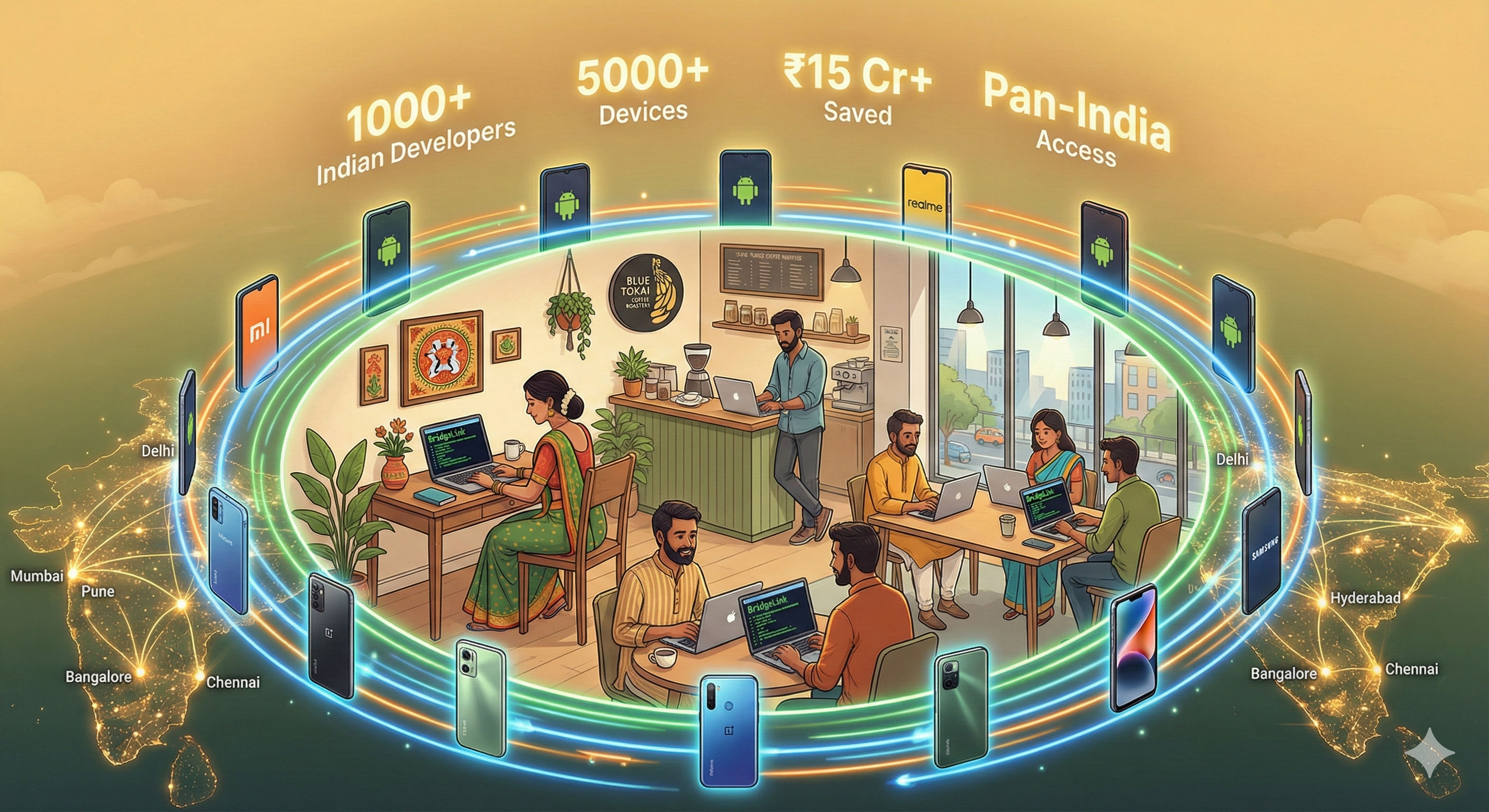
- Any developer, anywhere in India, instant device access
- 1000+ devices exposed across India via BridgeLink
- Open source enabling similar solutions for any Indian startup
The Bigger Picture
BridgeLink represents more than just a technical solution—it's about democratizing access to physical Android devices for Indian developers. By removing location barriers, we're enabling:
India-Wide Testing Inclusion:
├── Remote teams in Tier 2 cities testing on real hardware (no metro office needed)
├── QA teams in Pune/Hyderabad accessing Bangalore devices instantly
├── Startups saving ₹1.5 Cr+/year vs cloud device farms
├── Budget phone testing (Redmi, Realme) accessible to all developers
└── Individual developers owning their testing infrastructure
Technical Innovation for Indian Ecosystem:
├── Secure tunneling making local devices accessible across India
├── WiFi support crucial for Indian home offices (limited desk space)
├── Budget phone support (the devices Indian users actually use)
├── Auto-activation eliminating manual device management
└── Open source enabling community-driven improvements
Personal Reflection
Building BridgeLink taught me that the best engineering solutions often emerge from real-world frustration. When Priya couldn't access her test devices from HSR Layout, it wasn't just a workflow problem—it was an opportunity to rethink how Android device testing could work in India's remote-first world.
The project evolved from a weekend bash script to a platform used by thousands of Indian developers, proving that open source solutions can compete with expensive cloud services when they solve real problems elegantly.
The Journey Continues:
- Current users: 1000+ developers across India (and 40+ countries globally)
- Devices exposed: 5000+ physical Android devices
- Cost saved: ₹15 Cr+ vs cloud device farm alternatives
- Future: Building the definitive platform for remote Android device access in India
Want to join the revolution?
- 🚀 Try it:
pip install bridgelink - 🔧 Contribute: GitHub Repository
- 📖 Learn: Read the full documentation
- 💬 Connect: Share your Android testing challenges with the Indian dev community
Perfect for:
- 🏢 Bangalore/Pune/Hyderabad startups with distributed teams
- 🏠 Remote developers testing on budget phones (Redmi, Realme, Vivo)
- 💰 Cost-conscious teams saving lakhs on device farms
- 🚀 Individual developers building for Bharat
BridgeLink: Your physical Android devices, accessible from anywhere in India, anytime.
Discussion (0)
Join the Discussion!
Sign in to share your thoughts and engage with the community.